How do I Connect multiple flows for automatic daily triggers for my 60 days drip training contents?
Status: Closed · Asked by KAJOLA Hub on · 0 views
Hello Akeem,
Thanks for reaching out to us.
I'd like to clarify a couple of things about what you're trying to build so we can point you in the right direction.
First, on connecting flows for day-by-day delivery: for a sequence to run, each step in a Chatflow automation must be visually connected with connecting lines between the nodes. If the next-day flow isn't delivering, please confirm the nodes are fully linked, then save and re-test. Also note that when a Set Delay (scheduled delay) time has already passed and is in the past, the system halts execution at that step — so make sure any scheduled delay points to a future date/time.
Second, and importantly, on your request to automatically deliver messages at specific times of day across 60 days: Pabbly Chatflow does not natively support time-based scheduled or recurring daily triggers that run at a fixed time to send messages. Chatflow flows are triggered by conversational events (incoming messages, keywords, button clicks, opt-ins, etc.), not by a clock/cron schedule.
For a fixed-time daily drip over 60 days, the recommended approach is to use Pabbly Connect alongside Chatflow. Pabbly Connect has a Schedule trigger that can run daily at a chosen time and timezone; from there you can maintain your contact list (Google Sheets, Airtable, CRM, etc.), filter contacts, and send the WhatsApp message via the API.

Pabbly Support:
Hello Akeem,Thanks for reaching out to us.I'd like to clarify a couple of things about what you're trying to build so we can point you in the right direction.First, on connecting flows for day-by-day delivery: for a sequence to run, each step in a Chatflow automation must be visually connected with

Your suggestion regarding Combination of Chatflow and Pabbly connect is well noted. Yes I have a Pabbly connect account.
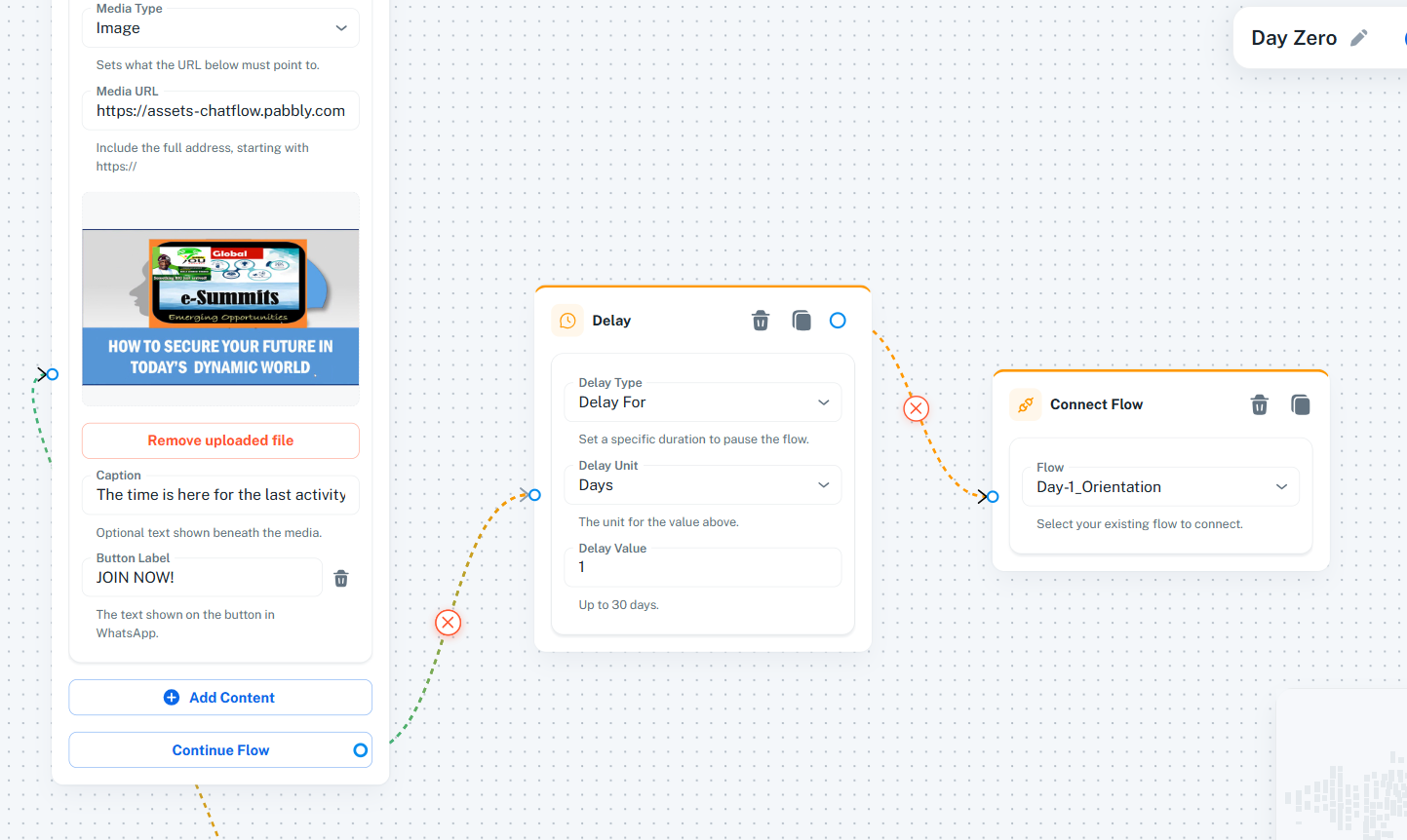
But Please take a look at what I did as shown in the screenshot, I do not know why the connected flow with a 1 day delay was not triggered for delivery.
Kindly check and assist.
Thanks
AKEEM
Hello there,
We checked the flow Day-1_Orientation and found that the trigger of the flow is a selected template, means when you send that template and someone click the quick reply button of that template then the flow will proceed further.
It doesn't seems you are sending that template from Flow Day Zero. How are you sending that template?
Pabbly Support:
Hello there,We checked the flow Day-1_Orientation and found that the trigger of the flow is a selected template, means when you send that template and someone click the quick reply button of that template then the flow will proceed further.It doesn't seems you are sending that template from Flow Day
Please I am sending the flow from Day-1 Orientation flow.
Please how
Hello Akeem,
We have reviewed your "Day-1_Orientation" flow and the recent changes made around the reported time. We found that the current workflow configuration seems to be incomplete.
Please review the following points:
Trigger Configuration (Regex Keyword Match): The current regex keyword is set to the full workflow name, making it difficult for users to trigger the flow through their replies. We recommend using a simpler keyword, such as "hello" or "orientation", for more reliable triggering.
Template Delivery Setup: The current configuration only shares the template and does not include the subsequent workflow steps required to automate your use-case.
Pabbly Connect Account Requirement: As mentioned earlier, time-based scheduling for daily messages throughout your 60-day program requires Pabbly Connect. However, we could not locate an active Pabbly Connect account associated with your registered email address ([email hidden]). Please ensure you have an active Pabbly Connect account to configure the required scheduled automation alongside Chatflow.
Please review these points and update the configuration accordingly. If you need any technical assistance, feel free to share your queries with us.
Thanks & Regards,
Shekh Dilshekh
Customer Support Specialist