I have three automated Facebook posts that are not being published to my account.
Status: Answered · Asked by Pavel Mouafo on · 0 views
Hiello,
Thank you for your patience while we investigated the issue with your workflow.
Upon reviewing the execution logs, we found that Facebook was unable to retrieve and process the images directly from the original Backblaze URLs, resulting in the Error 324 – Missing or invalid image file response.
To address this, we implemented and tested an alternative approach in your workflow:
Added a File Uploader Step: We inserted the File Uploader by Pabbly action before the Facebook Pages action.
Generated Accessible File URLs: The images are now passed through the File Uploader step first, which generates new file URLs that Facebook can access.
Updated the Image Mapping: We mapped the newly generated URLs into the Facebook Pages – Create Multi Image Post action.
We then tested the updated configuration, and the execution completed successfully with a 200 Success response from Facebook.
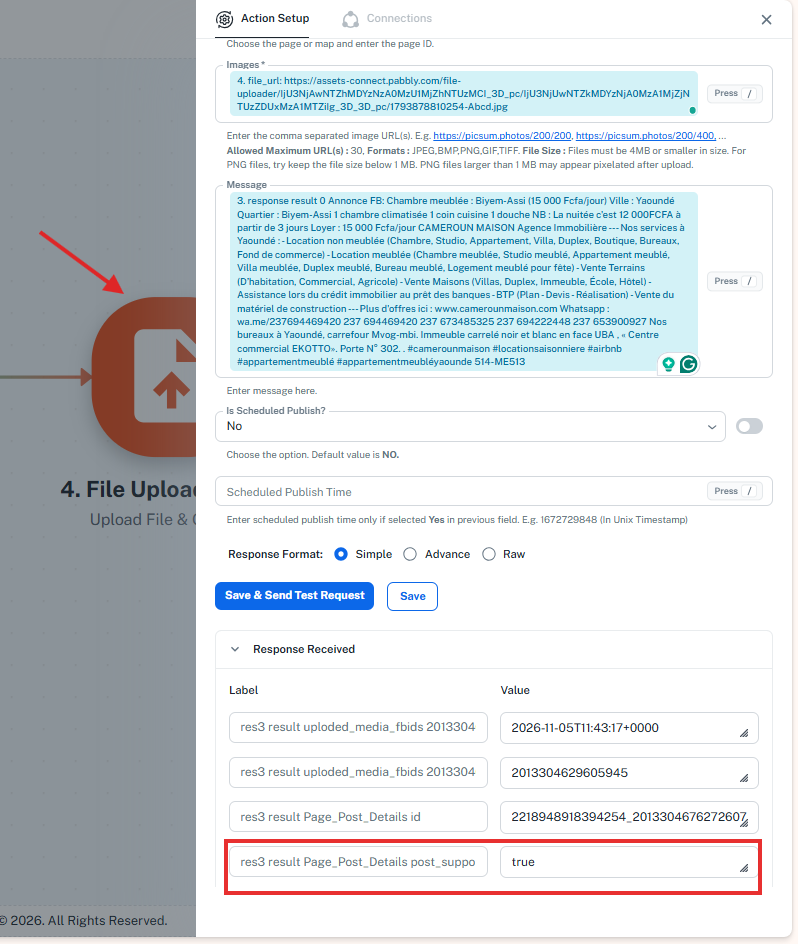
We recommend running the workflow with your complete set of images to verify that everything works as expected. Please let us know the outcome, and we will be happy to assist further if needed.
Thanks & Regards,
Shekh Dilshekh
Customer Support Specialist
Thank you for your quick response.
My photo URLs are stored in a Google Sheet, and the images themselves are hosted on Backblaze B2. Each listing requires a post containing 10 different photos. I am not sure how to create a post with 10 distinct images using your method. Could you please show me how to create a Facebook post with 10 images for each listing, using my URLs?
Thank you for your reply.
Very important note: I have an automation for Facebook that uses one image per ad, with the URLs stored on Backblaze B2. This automation works without any issues using the Backblaze B2 URLs.
IjU3NjYwNTZmMDYzZTA0MzA1MjZhNTUzMzUxMzM1MTY3NTQzMTBmMzYi_pc
The first four posts from my automation—each containing a single photo per ad—were published successfully. However, the fifth post and those that followed were not published on Facebook.
Hi Pavel,
Thank you for your update.
Upon checking, we observed that the rows are being fetched in an incorrect format into a single row, causing the data to not format properly.
To help us investigate and resolve this issue effectively, could you please share access to your Google Sheet with the following email addresses?
• support@pabbly.com
• shekh.dilshekh@pabbly.com
• vinay.jain@pabbly.com
Note: If your sheet contains any sensitive data, please share access exclusively with our support email address (support@pabbly.com).
Looking forward to your reply so we can assist you further.
Thanks & Regards,
Shekh Dilshekh
Customer Support Specialist
Hello. I have just shared access to two Google Sheets with this email address: support@pabbly.com. One Google Sheet is for a listing with 10 photos, and the other Google Sheet is for a listing with 1 photo.
I shared the two Google Sheets with these three email addresses: support@pabbly.com
One of the files is a template for ads with 10 images per ad. The other Google Sheet file displays one image per ad.
I’m sending the IDs for both automations via Pabbly Connect
IjU3NjYwNTZmMDYzZTA0MzE1MjY0NTUzNDUxMzM1MTZhNTQzMzBmMzci_pc
IjU3NjYwNTZmMDYzZTA0MzE1MjY5NTUzNDUxMzA1MTZhNTQzMDBmMzYi_pc
Hello,
Thank you for highlighting your concerns and sharing the required details with us.
We have reviewed your workflow along with the Google Sheets access you provided. After implementing the suggested configuration, the previous Error 324 was resolved. However, a new Error 100 (OAuthException) is now occurring, and the Facebook multi-image post is still not being published successfully.
To investigate this further and identify the exact cause, we would like to arrange a meeting with you so we can review the workflow and troubleshoot the issue in real time.
Kindly book a meeting at your preferred date and time using the link below:
Meeting Booking Link: https://www.draftmeet.com/book/lnk_170c48cbe0325abe7b2c759e6e203679
We appreciate your cooperation and look forward to working with you toward resolving this issue.
Thanks & Regards,
Shekh Dilshekh
Customer Support Specialist
Hello
Thank you very much for your prompt response and for everything you're doing to resolve my issue.
I've scheduled an appointment for November 16, 2026, at 11:00 a.m.
I'm not sure how the meeting will go.
Hello Pavel,
Thank you for confirming!
We’ll walk through everything together step-by-step during the meeting to get this sorted out for you.
Looking forward to speaking with you.
Thanks & Regards,
Shekh Dilshekh
Customer Support Specialist
Hello,
We are currently waiting in the meeting lobby. Please join the meeting using the shared link whenever you are ready.
We look forward to speaking with you.
https://meet.google.com/dcp-xvuf-qgt
Thanks & Regards,
Shekh Dilshekh
Customer Support Specialist
Hello Pavel,
As per our scheduled session, we joined the meeting on time and also sent a reminder.
However, as no one joined the meeting and we had other scheduled sessions to attend, we had to leave after waiting beyond the scheduled time.
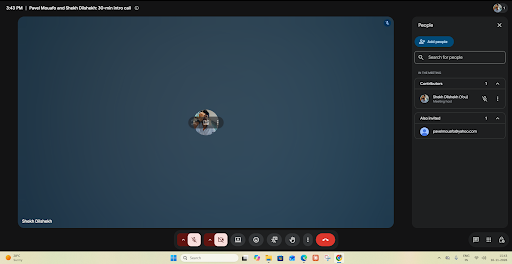
Please let us know if the issue still persists or if you require any further assistance. We would be happy to coordinate accordingly and help you resolve it.
Thanks & Regards,
Shekh Dilshekh
Customer Support Specialist