Meta Catalog Not Syncing/Fetched in Pabbly Chatflow
Status: Closed · Asked by kunj gupta on · 0 views
Hello Pabbly Support Team,
I am facing an issue with the Catalog section in Pabbly Chatflow. My Meta catalog is properly created and connected to my WhatsApp Business Account, but Pabbly is not fetching/showing the catalog.
Details:
- WhatsApp Number: +91 9217667394
- Business Portfolio ID: 637273219472771
- WhatsApp Business Account ID: 1681656246536850
- Catalog Name: DigiBuggy PC Builds
- Catalog ID: 1779655739948618
I have already verified the following:
- The catalog exists in Meta Business Suite.
- The catalog is connected under WhatsApp Manager → Catalog.
- The WhatsApp number is active.
- The catalog belongs to the same Business Portfolio.
- I have entered the correct Business Portfolio ID in Pabbly.
- I have also tried Sync Catalogs multiple times, but the catalog list remains empty.
I have also taken a Pabbly subscription and need this catalog functionality to work for our WhatsApp setup.
Could you please check the Meta API permissions/authorization between our Meta Business Portfolio and Pabbly Chatflow and help us resolve this issue?
I have attached screenshots showing the Meta catalog configuration and the empty catalog section in Pabbly.
Please let me know if you need any additional information or if any permission needs to be enabled from our Meta Business Manager.
Thank you.
Hello Kunj,
Thank you for sharing the detailed information.
To resolve the catalog syncing issue, please try reconnecting your WhatsApp number in Pabbly Chatflow without deleting the existing number.
Please follow these steps:
Go to your Pabbly Chatflow account.
Add/connect your WhatsApp number again.
During the connection process, select the “Connect with Catalog” option.
Complete the connection process and check whether your “DigiBuggy PC Builds” catalog appears in the Catalog section.
For your reference, we have attached a screenshot highlighting the “Connect with Catalog” option.
Once done, please check the Catalog section again.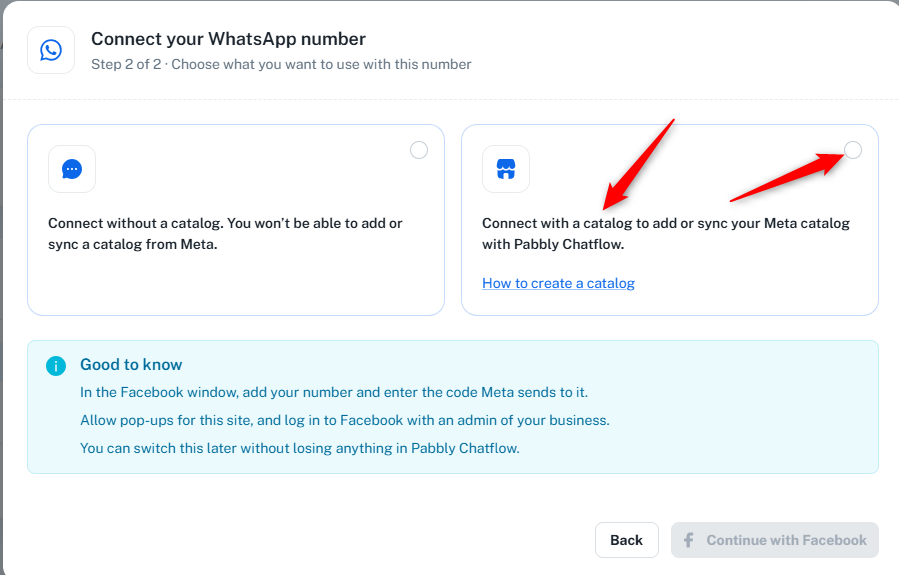

Hello Kunj,
Just following up on our previous message regarding the catalog syncing issue.
We hope you were able to reconnect your WhatsApp number using the “Connect with Catalog” option. Please let us know if the “DigiBuggy PC Builds” catalog is now appearing in the Catalog section or if you need any further assistance.
Hello Pabbly Support Team,
I followed your instructions and retried connecting my existing WhatsApp number through Connect with Catalog, but my catalog is still not syncing.
My details:
WhatsApp Number: +91 9217667394
Business Portfolio: Digibuggy 1
Business Portfolio ID: 637273219472771
WhatsApp Business Account ID: 1681656246536850
Catalog Name: DigiBuggy PC Builds
Catalog ID: 1779655739948618
The catalog contains 5 products and is connected to my WhatsApp account in Meta. However, Pabbly Chatflow is still not fetching it. During the connection process, Meta also displays the message that my WhatsApp account and profile will be shared with MagnetBrains LLC.
Could you please help me identify why the catalog isn't appearing and confirm whether this business-sharing setup is correct? Please provide the exact steps to resolve the issue without disrupting my existing WhatsApp connection.
Thank you.
Hi Kunj,
Thank you for sharing the details.
Since you’re currently posting on a public forum, we recommend sharing your account-related information and further details directly with us at support@pabbly.com instead. This will allow us to review your concern more appropriately.
We’d also like to discuss a few details with you and check the catalog synchronization issue together. Please use the following link to schedule a meeting at your convenience:
Meeting Scheduling Link: https://www.draftmeet.com/book/lnk_d63511e2ff5f6cf8fb49ee1778080dcd
Once the meeting is scheduled, we can review the issue and guide you through the next steps without unnecessarily disrupting your existing WhatsApp connection.

Hi Kunj,
We’re following up on the catalog synchronization issue. Please let us know if you’ve scheduled a meeting using the link shared earlier or if you need any assistance.
Hi,
We’re following up on our previous message regarding your query. As we haven’t received a response, this will be our last follow-up, and the thread will be closed automatically.
If you still need assistance, you can email us again at support@pabbly.com to raise your concern.
We would also greatly appreciate it if you could share your feedback on your support experience using the following link: https://bit.ly/3V2Pjia