

The maximum allowed timeout in Pabbly is 25 seconds. Currently, 25 seconds is the soft limit configured at the platform level.
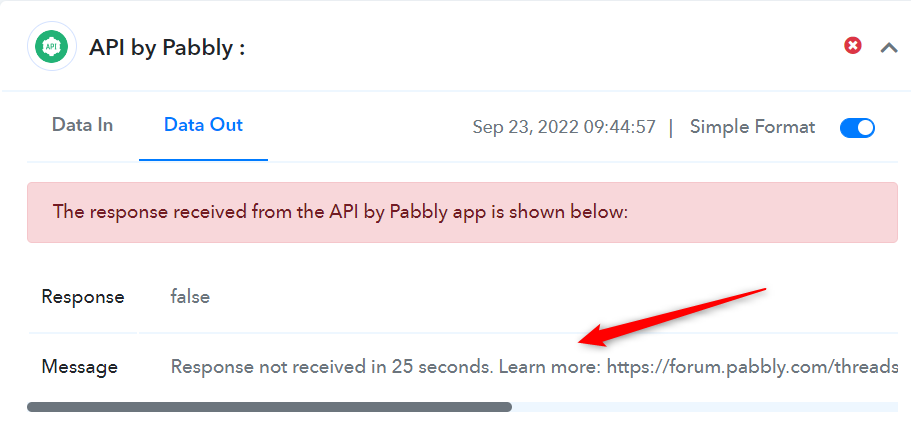
If the response does not arrive within 25 seconds, the connection for that action step is closed. The system then returns a timeout message stating that the response was not received within the allowed time.
These integrations are carefully reviewed and handled separately due to their processing requirements.
However:
Timeout Implementation by the External Platform.
What needs to be done ideally.
If the response does not arrive within 25 seconds, the connection for that action step is closed. The system then returns a timeout message stating that the response was not received within the allowed time.
Special Timeout Handling for Selected Integrations
Timeout limits are increased only for specific integrations that have been explicitly configured for extended processing time.These integrations are carefully reviewed and handled separately due to their processing requirements.
However:
- 25 seconds remains the standard and maximum timeout limit for all applications by default.
- Extended timeout (such as 60 or 100 seconds) is applied only to specifically approved and internally configured integrations.
Timeout Implementation by the External Platform.
Step 1: The Host system (In this case in Pabbly Connect) sends the request to the external API/App provider.
Step 2: The external API System captures that request and starts to do the processing at its end from that data.
Step 3: Processing by the external API system takes longer and the external system expects the Host System to wait for the response to be sent back.
Step 4: The host system (Pabbly Connect) remains busy waiting for the external API to send back the API response which in turn leads to blocking of the CPU thread as the same thread can't process any other request while waiting for the response.
What needs to be done ideally.
Step 1: The Host system (In this case in Pabbly Connect) sends the request to the external API provider.
Step 2: The external API/System captures that request and immediately sends back the id of the request to the Host system (Pabbly Connect). The host system (Pabbly Connect) does not need to wait for the response as it already received the id of the request that it sent to the external API provider.
Step 3: After sending the ID back as a response, the API provider takes the data for the backend processing which might take some time.
Step 4: You add a comfortable delay of 5 minutes in your automation workflow inside Pabbly Connect, this delay is the amount of delay that you think should be sufficient for the data to be processed by your API provider.
Step 5: You do a GET API request again to your API provider providing them with the id of the prior request with your request. Based on the id of the prior request, the external software gives you the data immediately without the need of waiting.
This process will be an ideal use case to satisfy any type of waiting limits.
Attachments
Last edited by a moderator:

