Pabbly subscription clarification..
Status: Open · Asked by Team Foto Owl -Common on · 0 views

Hi,
Thanks for reaching out, and great question!
This is expected behaviour and your plan is working correctly. Under the Pabbly Connect Unlimited plan, tasks are credited as an initial allocation rather than being uncapped at all times. Your account starts with a large batch of tasks (in your case 110,000), and once you consume around 80% or more of that allocation, a Reset button becomes available in your account settings.
Using Reset refreshes your task count so you can keep running your automations without interruption. You can repeat this reset process as needed throughout your subscription, which is what makes the plan effectively unlimited. Please note the Reset option can be used once every 24 hours, and resetting does not affect your running workflows, only the task counter is refreshed.
Steps to Reset Your Task Count:
Log in to your Pabbly Connect dashboard.
Go to settings option from left side on page.
Once your task usage reaches 80% or above, a Reset Tasks button will appear.
Click Reset to instantly refresh your task counter back to your full allocation.
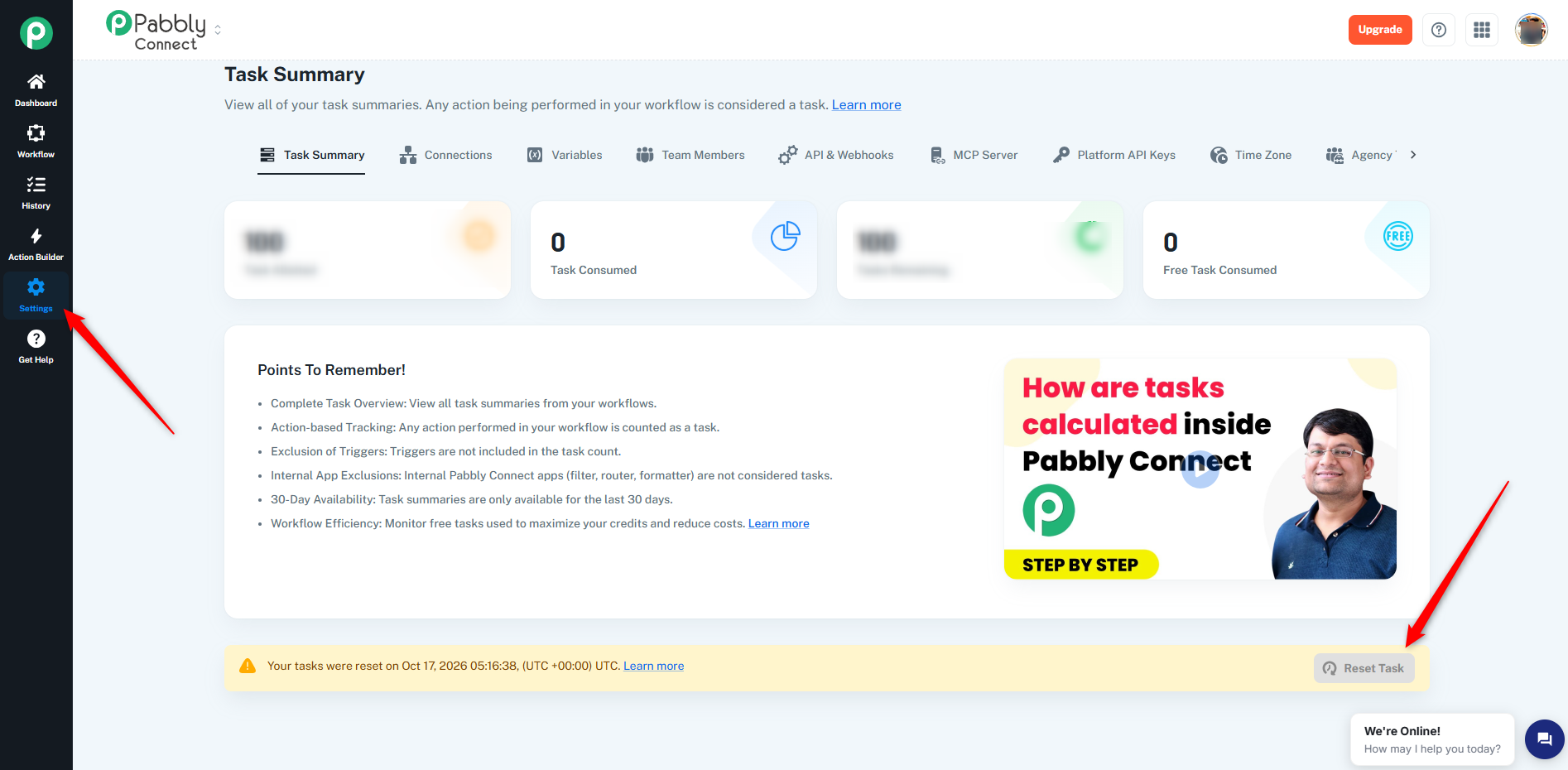
Note: This task reset feature is available exclusively for Unlimited Plan users.
Please let us know if you have any further questions.
Aditya Chourey
Customer Support Associate
🌐 Pabbly.com
👉 Rate your support
Black Friday Early Access