Why the Filter condition still is true when hit the "Does not contain" value?
Status: Open · Asked by Ton Won on · 0 views
Hello,
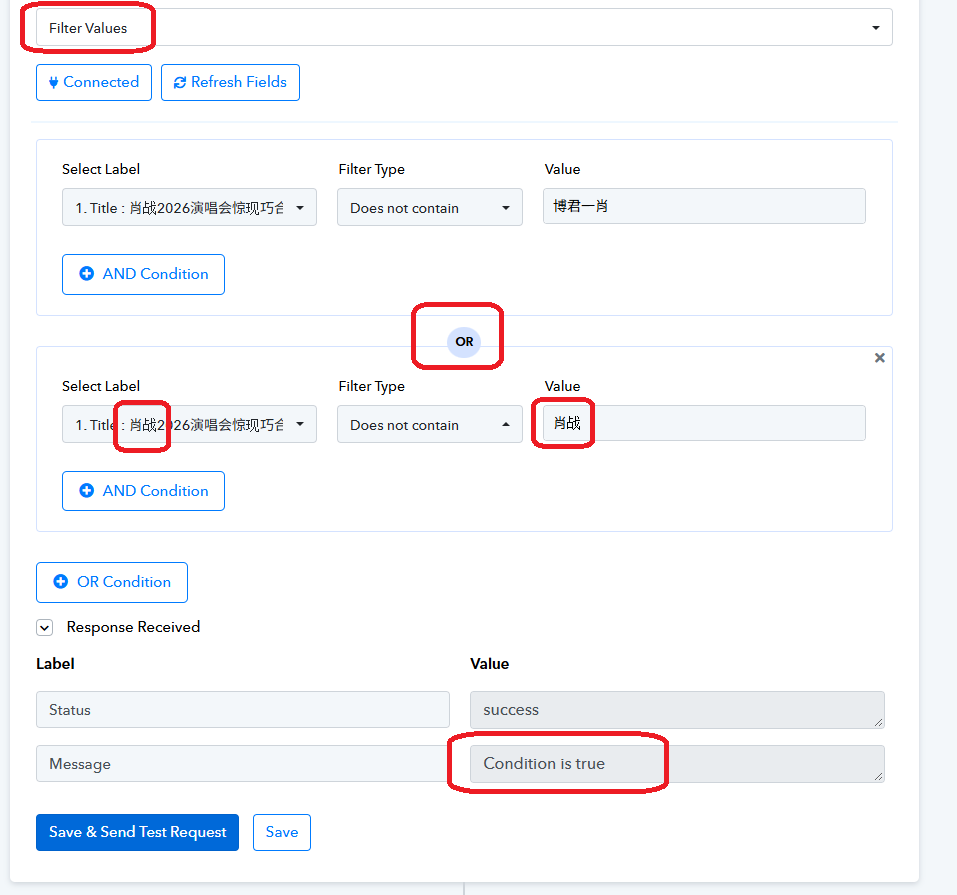
We reviewed the screenshot you shared and noticed that your Filter step contains two “Does not contain” conditions connected using an OR operator.
With the OR operator, the filter passes if either condition evaluates to true. Therefore, even if the text matches one of the specified values, the filter may still return true if the other “Does not contain” condition is satisfied.
If your intention is to proceed only when the text does not contain either of the specified values, please change the operator between the two conditions from OR to AND.
Please save the changes and test the workflow again to verify the result.
so if I have many keywords, then I keep use "AND", right?
Hello,
Yes, if you have multiple keywords that you want to exclude from the title, you should use AND between the Does not contain conditions.
For example, if you want to exclude titles containing either Keyword A or Keyword B, configure the filter as follows:
Condition 1: Title Does not contain Keyword A
AND
Condition 2: Title Does not contain Keyword B
This ensures that the filter passes only when the title contains neither Keyword A nor Keyword B. If either keyword is present, the corresponding condition will fail, and the filter will not pass.
You can add more Does not contain conditions using AND for additional keywords you want to exclude.
Please save the changes and test the filter using a few actual title examples to confirm the expected behavior.