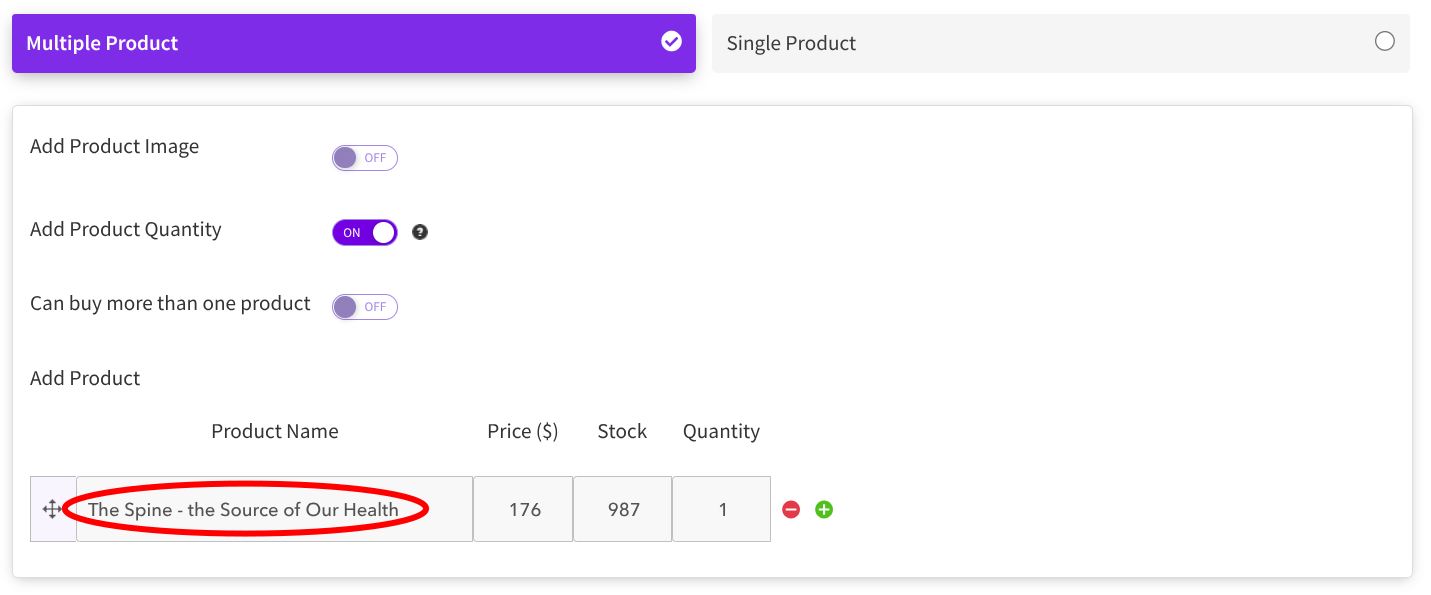
PayPal displays wrong information from Payment Module
Status: Closed Β· Asked by Jay Schwartz on Β· 0 views


Hello,
Thank you for sharing the screenshots.
We checked the form submission from our end by filling out the form and testing a submission. The submission is being received correctly, but we are not seeing the data in the same format as shown in the screenshots you shared.
Could you please confirm where you are getting this data from / which screen or source you are referring to? In particular, the highlighted Item Name and the Class Code are not appearing in the test submission we received.
Please share the source URL or a screenshot of the page where you are seeing these details so that we can compare it with the form submission and check this further.
Pabbly Support:
Hello,Thank you for sharing the screenshots.We checked the form submission from our end by filling out the form and testing a submission. The submission is being received correctly, but we are not seeing the data in the same format as shown in the screenshots you shared.Could you please confirm wher
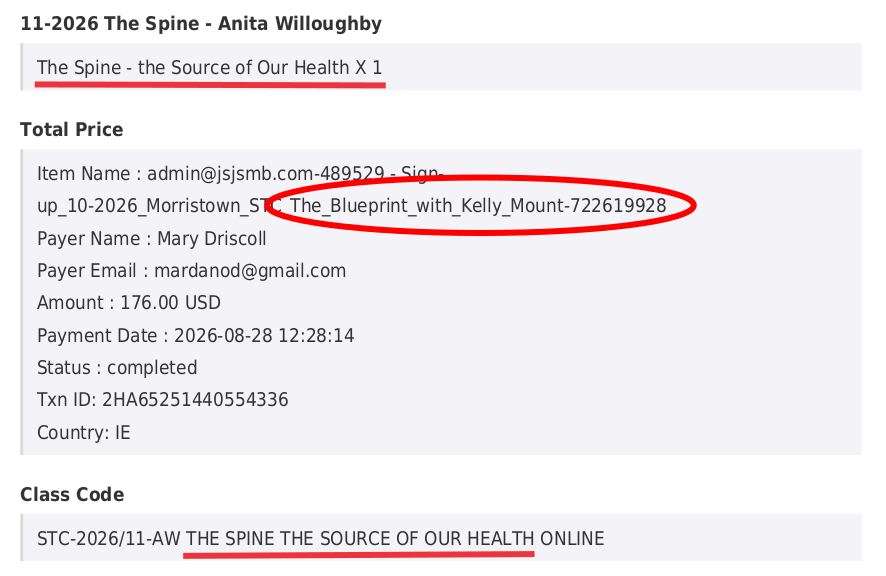
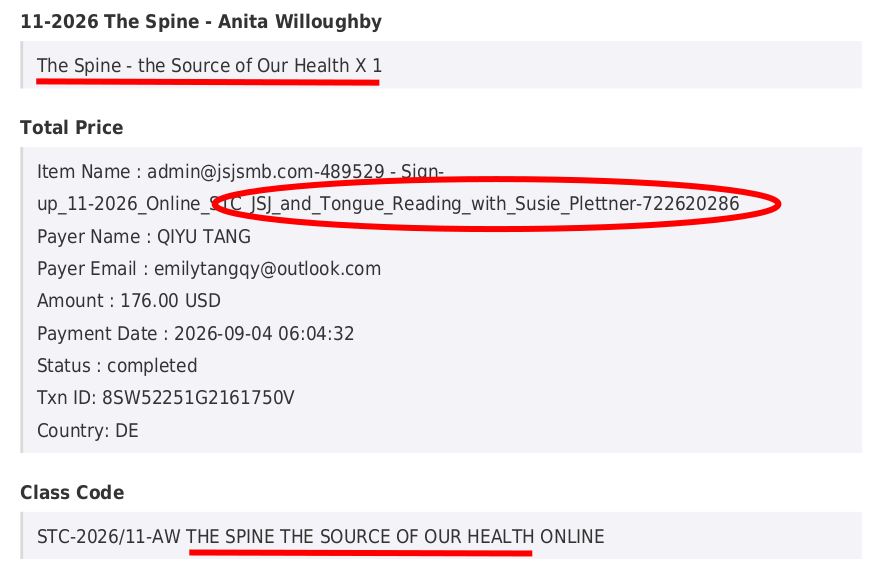
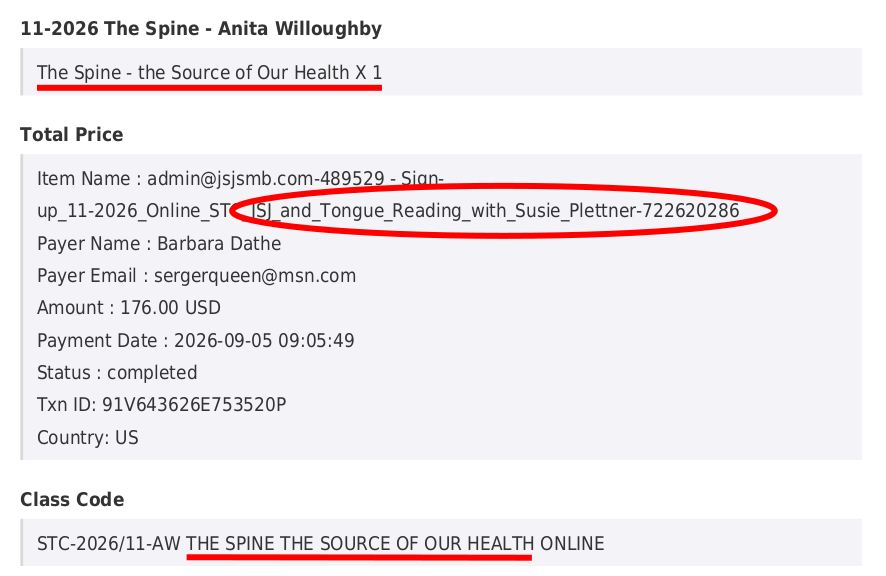
The PayPal information is found on the PDF downloads for each submission.
This is the Form I used as the example:
https://forms.pabbly.com/view_new/form/cY2o-722620238
The downloaded PDFs are from the Submission page:
https://forms.pabbly.com/entries/show/cY2o-722620238
To get the PDF, open the submission page by clicking the ink above, and then:
- click on Barbara Dathe to open the submission
- go to the top right and click the PDF icon (see screenshot below) to download the submission as a PDF file
- open the PDF file and scroll down to Page 2
- I took a screenshot of the Product, Total Price & Class Code sections
Repeat these steps to download PDF's for Emily Qiyu Tang and Mary O'Driscoll.
I hope this helps you track down what is causing the issue.
Click the PDF icon to download PDF:

Hello Jay,
Thank you for providing the clear steps and directing us to Page 2 of the submission PDF download.
While testing this on our end, we noticed a different issue. We have escalated this directly to our concerned team for further investigation.
We will keep you updated here as soon as we have a fix.
I just worked on a form for a different class (Tongue Reading with Susie Plettner) and it looks like a fix from 2025 was undone.
Please look at this Forum post from 2025:
https://forum.pabbly.com/threads/autoresponder-not-sending-payment-received-email.32379
The past issue was that forms would send customers to different PayPal payment processes, but only 1 process would actually activate the Form's Settings > Email Notifications and record the transaction.
The fix in 2025 was to adjust the Forms to only use the "Review Order" payment process which activated the Email Notifications.
I just tested a form for a 2027 class and it reverted to using the process with the "Complete Purchase" button, which did not record the payment in Pabbly even though I paid a $1 test payment. The missing notification also breaks our Pabbly Connect workflow which parses the transaction data and updates our Google Sheets.
Please make sure that:
- all Forms use the PayPal "Review Order" process that activates Pabbly Email Notifications, or
- Fix the Forms so any PayPal payment process will record the transaction and activate Pabbly Email Notifications.
We need this fixed ASAP, since it broke multiple classes that are in the middle of registrations.
Sorry - I posted the wrong Forum link. Here is the correct Forum Post:
https://forum.pabbly.com/threads/cloned-form-sends-customers-to-wrong-payment-page.36214
It shows the changes that Pabbly made to our Forms.
Hello Jay,
Thank you for sharing the correct forum post.
Weβll check this from our end and update you accordingly.
Hello Jay,
As you mentioned, the earlier issue occurred after cloning a form, where the cloned form was expected to retain the same redirect link, but customers were being redirected to different URLs.
To help us, please share the following:
Form name(s) and Form URL(s) where you are currently facing the issue
Please confirm whether these Forms were cloned from another Form
Confirm whether the redirect links are currently the same as the original Form
If possible, please also share a screen recording of the setup and issue, similar to what you provided during the previous case. This will help us proceed with the investigation.
All new forms are cloned from a previous form to preserve fonts, colors, field names, etc. I then update elements like Form Name, Class Code & Payment Module info to match the new class.
This is the most recent form with the issue:
Sign-up 11-2026 Online STC JSJ and Tongue Reading with Susie Plettner
https://forms.pabbly.com/view_new/form/15TE-722620286
It was cloned from:
Sign-up 10-2026 Morristown STC The Blueprint with Kelly Mount
https://forms.pabbly.com/view_new/form/YkDt-722619928
The Tongue Reading video goes to the PayPal page with the "Complete Purchase" button and processes a $1 test payment, but the Submission PDF says "Unpaid", which shows that the Payment Notifications failed.
The Morristown video goes to the PayPal page with the "Review Order" button, which processes the $1 test payment, and the Submission PDF shows the $1 payment with a transaction ID and correct item name.
Remember that this is a separate bug that has re-appeared - the original issue of "PayPal Transaction information lists the wrong item name" also needs to be fixed.
---
- Tongue Reading video:
https://drive.google.com/file/d/1v7hbt8ldhqdpQkFWaFHf_BwB6mOkgbHg/view?usp=sharing
- Tongue Reading screenshot:

---
- Morristown video:
https://drive.google.com/file/d/1Pd6y6zrIX5hUZXMyEP9tp25Mti7POYdu/view?usp=sharing
- Morristown screenshot:

In case I didn't make it clear - the cloned Tongue Reading form redirects to a different PayPal page (the one with the "Complete Purchase: button) than the original Morristown form (which goes to the PayPal page with the "Review Order" button).
Hello Nikunj,
Thank you for sharing the deatils
Please allow us some time to pass these details to our technical development team so they can inspect the issue.
Thanks & Regards,
Hrishabh
Customer Support Associate
π Pabbly.com
π Rate your support
Hello Jay,
We've followed up with our technical team and are awaiting an update.
Once we have the update, we'll notify you.
Thank you.
Hello Jay,
Thank you for your patience while our technical team investigated the issue.
We have received confirmation from our technical team that the issue with the submitted item name and course name mismatch has been fixed.
Going forward, the item and course names should be displayed correctly in the submission and payment-related information.
Please note that this fix applies to new submissions. The details of previously submitted forms/transactions will remain unchanged.
Please test the affected form with a new submission and confirm that the item and course name are now appearing correctly.
Thank You!
I will test over the weekend and report the results.
Hello Jay,
Thank you for the update.
Sure, please test the form with a new submission over the weekend. Once tested, please share the results with us so we can confirm that the item and course names are now being displayed correctly.
Good news and bad news, unfortunately.
1) The good news:
A new student purchased the Spine Class (see original post), and the Submissions page PDF shows the correct information, so it looks like the "wrong class" bug is fixed. Thank You for this.
Screenshot - Clarina Allen - correct payment for Spine Class and matching Item Name:

2) The bad news:
I did a $1 test payment for the Tongue Reading Class, and the payment was not recorded because I was taken to the wrong PayPal page (Complete Purchase).
Please re-read my post from above (September 12th onwards) and re-apply the fix from 2025 so all forms go go to the correct (Review Order) PayPal page.
This is the Forum Post about the "Wrong PayPal Page" issue:
https://forum.pabbly.com/threads/cloned-form-sends-customers-to-wrong-payment-page.36214
It shows the changes that Pabbly made to our Forms.
Please re-apply this fix (posted June 4, 2026) so we can track payments accurately again.
Hello Jay,
Weβre glad to know that the first issue has been resolved successfully.
Regarding the second issue, could you please share a screen recording/video demonstrating the issue? This will help us clearly understand the behavior and forward the details to our technical team for further investigation.
Once we receive the recording, weβll share it with the concerned team and proceed accordingly.
Thanks & Regards,
Soumya Tripathi
Customer Support Lead
π Pabbly.com
To summarize the issue:
1) When a form works, it takes customers to a PayPal page with a "Review Order" button, and sends out Pabbly Payment Received notifications after the customer makes a purchase.
2) The issue happens when a cloned form takes customers to a PayPal page with a "Complete Purchase" button, which fails to send out Pabbly Payment Received notifications after the customer makes a purchase.
In this example, the Tongue Reading form goes to a "Complete Purchase" page, which processes the $1 test purchase, but the Pabbly form's submission page still says the Test Payment is "Unpaid".
TongueReading-TestPayment.mp4
https://drive.google.com/file/d/1a1BWO5EGfnXYFltPBVgWJdg95qzttrdJ/view?usp=sharing
Tongue Reading PayPal payment - $1 paid:

Tongue Reading Submission PDF - Unpaid:

The cloned form should not switch to a "bad" Paypal page - if the original took customers to a "Review Order" page, then the cloned form should do the same.
3) Here is a link to the first time I posted about this issue. It has details on how the developers fixed the issue.
Please re-apply the fix to this form (and all future cloned forms):
Part 3) is missing the link to the May 9th, 2026 Forum Post about the "Wrong PayPal Page" issue:
https://forum.pabbly.com/threads/cloned-form-sends-customers-to-wrong-payment-page.36214
Here is the response explaining how the developers fixed it:
===
Thank you for your patience.
We received an update from our technical team regarding the issue.
There was a problem with the payment configuration cloning process when the forms were cloned. Additionally, we found that certain form titles contained restricted words (such as "Signup") and special characters like ":" which were preventing the payment configuration from being saved correctly. We renamed the affected forms by removing those values and re-saved the payment settings.
Regarding your questions:
1. What was changed
The form titles were updated to remove restricted words/special characters, and the payment configuration was saved again. This resolved the issue and restored the expected PayPal checkout behavior.
2. If I clone the San Diego form again, will it reliably go to the "Review Order" page
Yes, the expected behavior is that a cloned form should function exactly the same as the form it was cloned from. You may try cloning the San Diego form again and test it. If you encounter any issues, please let us know.
3. What is the expected behavior of cloned forms going forward
Cloned forms should inherit the same payment configuration and checkout behavior as the source form and should redirect users through the same PayPal flow.
4. Can the other affected forms be fixed as well
Yes. We checked the other reported forms and found the same issue. The words like "Signup" and the ":" character in the form titles were preventing the payment configuration from being saved properly. We have updated the titles and re-saved the payment settings, so both forms should now be functioning correctly as well.
Please test the forms from your end and let us know how it goes.
Thanks & Regards,
Preeti Paryani
Customer Support Associate
Pabbly.com
===
Hello,
As per our discussion with the technical team, newly created forms should not face this issue when cloned. However, cloning older forms may cause such issues.
We therefore recommend creating a new form, cloning it, and then adding the payment redirection setup. Once done, please let us know whether the issue persists.
This will help us further identify the nature of the issue.
Hello,
Just following up on our previous email to check if you need any further assistance from our end.
Please feel free to let us know if you have any questions or concerns. Weβll be happy to assist you.
Pabbly Support:
Hello,As per our discussion with the technical team, newly created forms should not face this issue when cloned. However, cloning older forms may cause such issues.We therefore recommend creating a new form, cloning it, and then adding the payment redirection setup. Once done, please let us know whe
OK - I will check this and reply back with the results.
Hi,
Sure, please check and let us know the results.
Weβll be happy to assist you further if needed.
Hello,
Just following up on our previous email to check if you need any further assistance from our end.
Please feel free to let us know if you have any questions or concerns. Weβll be happy to assist you.
Hello!
It seems that the matter has been resolved, as we havenβt received any further queries from your side.
If there are any other concerns, please do let us know. We will be happy to assist you.