Unable to Capture Facebook & Instagram Lead Source in Google Sheet via Pabbly

Hello Pabbly Support Team,

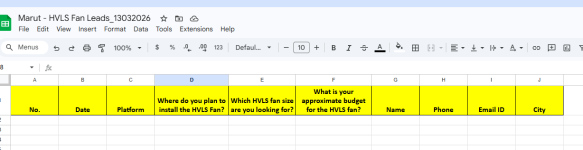
I have created a folder named Marut in Pabbly and inside it I created a worksheet called "Marut - HVLS Fan Leads_27012026" where all my leads are getting captured successfully.

However, I want to track whether the lead is coming from Facebook or Instagram.

Could you please guide me on what I need to set in the "Platform" option in Pabbly so that I can differentiate between Facebook and Instagram leads in my Google Sheet?

It would be very helpful if you could explain which field I should map for the platform/source in the workflow.

Thank you.

Best Regards,
Nimesh
 

Attachments

  • Screenshot_163.png
    Screenshot_163.png
    38.6 KB · Views: 12
  • Screenshot_164.png
    Screenshot_164.png
    37.9 KB · Views: 11

Preeti Paryani

Well-known member
Staff member
Hi @Nimesh Koshti,

In your workflow, under the Facebook Lead Ads trigger, there is a Refresh Fields button next to the Select Response dropdown. We clicked this button and the latest responses from your task history were captured in the response list.

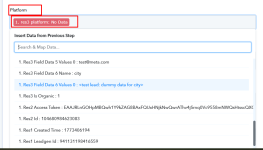
We then selected the latest response, and in the captured data we found a field named “Res3 Platform”, which indicates the platform from which the lead was generated (for example: fb for Facebook).

You can simply map this “Res3 Platform” field in your Google Sheets action step under the Platform column. This will allow you to identify whether the lead is coming from Facebook or Instagram when the data is added to your Google Sheet.

1773399468678.png


1773399480756.png
 
Thank you response. As per shared above screenshots. This is working.

But Not issue is,

I have made new sheet and also added some column change and modify then not showing Res3 Platform: fb.

I have also added new sheet and just need to add facebook/instagram.


What should i do for this?

Note: Now I have stopped my ads. what this ads should be started for you to check?
 

Attachments

  • This is new sheet.png
    This is new sheet.png
    34.5 KB · Views: 10
  • platform.png
    platform.png
    32 KB · Views: 10
Last edited:

ArshilAhmad

Well-known member
Staff member
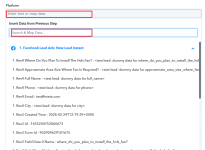
You had captured a test lead in your Facebook Lead Ads trigger step, because of which the platform wasn't visible. We have selected a real lead in your trigger step, and the Platform is visible now. Please avoid selecting or capturing test leads in your trigger step.
1773426466497.png


Now, in your Google Sheets: Add New Row action step, refresh the Select Spreadsheet field, select the newly created spreadsheet, remap the data from above, and save the step. This will allow the new leads to be added to your new spreadsheet.
1773426617396.png


Thanks & Regards,
Arshil Ahmad
Customer Support Associate
🌐 Pabbly.com
👉Rate your support
 
Hello,

Thank you for sharing details. (Arshil Ahmad and Preeti Paryani)

Both things are working fine.

But I have question related to response tab

When I create a new Workflow how can i enable this options from myside?

I have multiple ads and multiple forms in same page.

Please share the steps also share video if you have.
 

Preeti Paryani

Well-known member
Staff member
Hi @Nimesh Koshti,

It seems you want to capture the Platform field when creating new workflows.

Please note that this field is usually available only when real leads are captured. When setting up a new workflow, you generally capture the initial response using test leads, and some fields (like Platform) may not appear in those responses.

Once a real lead is received and visible in the Task History, you can follow these steps:
  1. Go to the Facebook Lead Ads trigger step in your workflow.
  2. Click the Refresh Fields button next to the Select Response dropdown.
  3. The system will fetch the latest responses from your task history (if available).
  4. Select the latest response, and you should then see the Platform field (e.g., fb or ig).
  5. After that, you can map this field in your Google Sheets step.

If you are referring to anything else or need help with multiple forms/ads setup, please let us know, and we will be happy to assist further.

1773476008049.png
 
Top