Whatsapp Business Account blocked
Status: Open · Asked by John Kalambayi on · 0 views
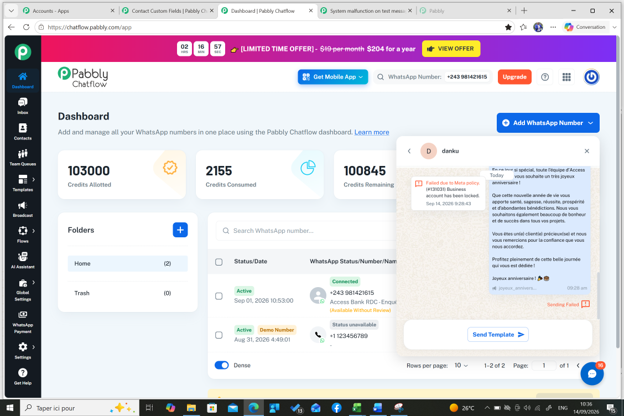
We noticed that our Whatsapp business account number had been blocked.
Meanwhile all the messages we usually send were approved by Meta.
We are surprised to discover that we were blocked even though we used approved messages.
Kindly assist on this matter.
Regards
Hello John,
Thank you for reaching out, and I'm sorry for the disruption this is causing.
When your WhatsApp Business account shows as blocked in Pabbly Chatflow, this restriction is applied directly by Meta at the WhatsApp Business Account (WABA) level. Even when your message templates are approved, Meta can still place a separate policy or quality restriction on the WABA itself that pauses sending. Pabbly is unable to lift or override a Meta-side block, as only Meta can review and reinstate the account.
Here is how to investigate and resolve it:
1. Log in to your Meta Business Manager (https://business.facebook.com/) and open the Account Quality section for the specific WhatsApp Business Account (not just the overall business portfolio). Any restriction or review status on that WABA will be shown there, along with an option to appeal directly to Meta if applicable.
2. In WhatsApp Manager (https://business.facebook.com/wa/manage/phone-numbers/), check under Account Tools -> Phone Numbers for any quality rating alerts or restrictions on your number.
3. If a restriction or violation is listed, submit an appeal/request for review directly through Meta. This is the only path to restoring a Meta-imposed block.
4. While the number is under review, you can connect a different verified WhatsApp Business number to Pabbly Chatflow to keep operations running.
Once Meta lifts the restriction, sending through Pabbly Chatflow will resume automatically.
If Meta's Account Quality page shows no restriction at all on that WABA, please share a screenshot of it so we can review your setup further.
Thanks & Regards,
Hrishabh
Customer Support Associate
🌐 Pabbly.com
👉 Rate your support