- Your Workflow URL
- https://connect.pabbly.com/workflow/mapping/IjU3NjcwNTZjMDYzMzA0MzM1MjZkNTUzMzUxMzQi_pc
- Consent to Access & Modify
- I authorize Pabbly Support to log in to my account and make changes to the specified workflow for troubleshooting.
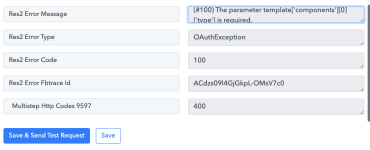
Attached is the fields am getting error how can i fix it ?
If you can check within my account :-
Workflow name : Ai Video Intro 50 Min Session
Temaplate used : 50_min_aivideo_registration
And, How do i use template with image Name : marathi_intro_registration_confirmed
I been trying for 3-4 days , earlier had issue with connection it was not showing template, so i have reset the entire connect, not its showing template in drop down but error in responce -
If you can check within my account :-
Workflow name : Ai Video Intro 50 Min Session
Temaplate used : 50_min_aivideo_registration
And, How do i use template with image Name : marathi_intro_registration_confirmed
I been trying for 3-4 days , earlier had issue with connection it was not showing template, so i have reset the entire connect, not its showing template in drop down but error in responce -