Woocommerce Cart Recovery Trigger Interval

optired

Member
Ref:


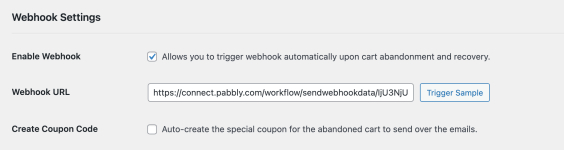
Hi, we have followed the video and set up Cart Abandonment Recovery via Whatsapp successfully.


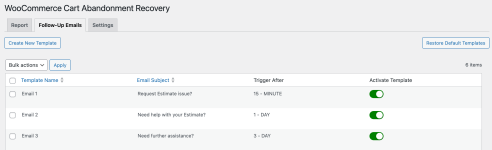
In the screenshot, you can see the plugin have the setting to send at 3 different intervals: 15-mins, 1-day, 3-days follow-up emails.


May I check if the same webhook is being triggered at that 3 different intervals?


How can we filter it so that we can send different whatsapps message at the 3 different intervals?


Thanks!
 

Attachments

  • Screenshot 2023-10-26 at 1.56.08 PM.png
    Screenshot 2023-10-26 at 1.56.08 PM.png
    37.6 KB · Views: 161
  • Screenshot 2023-10-26 at 1.56.24 PM.png
    Screenshot 2023-10-26 at 1.56.24 PM.png
    26.4 KB · Views: 142

optired

Member
Hello @optired , You can use Delay action in pabbly , It'll delay your output for minutes,hours,days & weeks.

View attachment 33407

If I set it up like that, I imagine there will be some issues with unwarranted cart recovery messages.

Example:
What if the customer recovered the cart before interval 2, but the workflow will still send out interval 2 message if I follow your suggestion?
 

Himesh

Active member
If I set it up like that, I imagine there will be some issues with unwarranted cart recovery messages.

Example:
What if the customer recovered the cart before interval 2, but the workflow will still send out interval 2 message if I follow your suggestion?
Before delay Action you can Retrieve cart data by woo Commerce Retrieve actions.
 
Last edited:

Himesh

Active member
not sure what to do with that step, is it to check if there are zero items in the cart and set up a roter?
You have to fetch all orders for that customer in last 1-day/2-days using custom API call to check if that customer has already placed an order with you or not. The plugin can handle the emails dynamically but not the webhook.

It doesn't send the order id in the webhook and both orders are considered as separate order anyways so you can't exactly track it.
 
Top