workflow not initiating
Status: Closed · Asked by Vir Singh on · 0 views
when the row is created via a google form the workflow initiates, however when the row is added via a webhook it does not initiate.
Hi Vir,
Thank you for reaching out.
To help us investigate why the workflow is not triggering when a new row is added via webhook, could you please provide a screen recording of the process at support@pabbly.com Specifically, please show the action of adding the record via webhook and the subsequent lack of activity or capture within your Pabbly Connect workflow.
This will help us visualize the data flow and identify where the trigger might be failing.
Aditya Chourey
Customer Support Associate
🌐 Pabbly.com
👉 Rate your support
Black Friday Early Access

https://drive.google.com/file/d/1OUwCR3M9c-65mybz5M_OSJcWCRRgAl14/view?usp=sharing
pls see the recording
Hi Vir,
Thank you for providing the screen recording; it has been very helpful in understanding the issue you are facing.
To investigate this behavior further and pinpoint why the workflow is failing to trigger specifically when data is added via a webhook, could you please provide the direct link to the Google Sheet you are using? Additionally, please grant editor access to this sheet for both aditya.chourey@pabbly.com and support@pabbly.com. Having this access will allow our team to conduct live tests and verify how the sheet interacts with the trigger functionality directly.
Once you have provided these details, I will take a much closer look at the configuration and promptly update you on my findings.
Aditya Chourey
Customer Support Associate
🌐 Pabbly.com
👉 Rate your support
Black Friday Early Access
Access given
Hi Vir,
We have reviewed your Google Sheet and identified why the workflow is not triggering when rows are added via a webhook.
When a new row is added through Google Forms, Google Sheets automatically triggers the event. However, when a row is added through a third-party webhook, Google Sheets may not automatically notify Pabbly Connect about the new entry.
To resolve this, you can use the following options:
Option 1: Auto Send on Schedule (Beta)
Open your Google Sheet.
Navigate to Extensions → Pabbly Connect Webhooks.
Select Auto Send on Schedule (Beta) (as shown in the attached screenshot).
This option will automatically send the data to your Pabbly Connect workflow trigger every hour.
Please refer to the attached screenshot to locate the Auto Send on Schedule (Beta) option.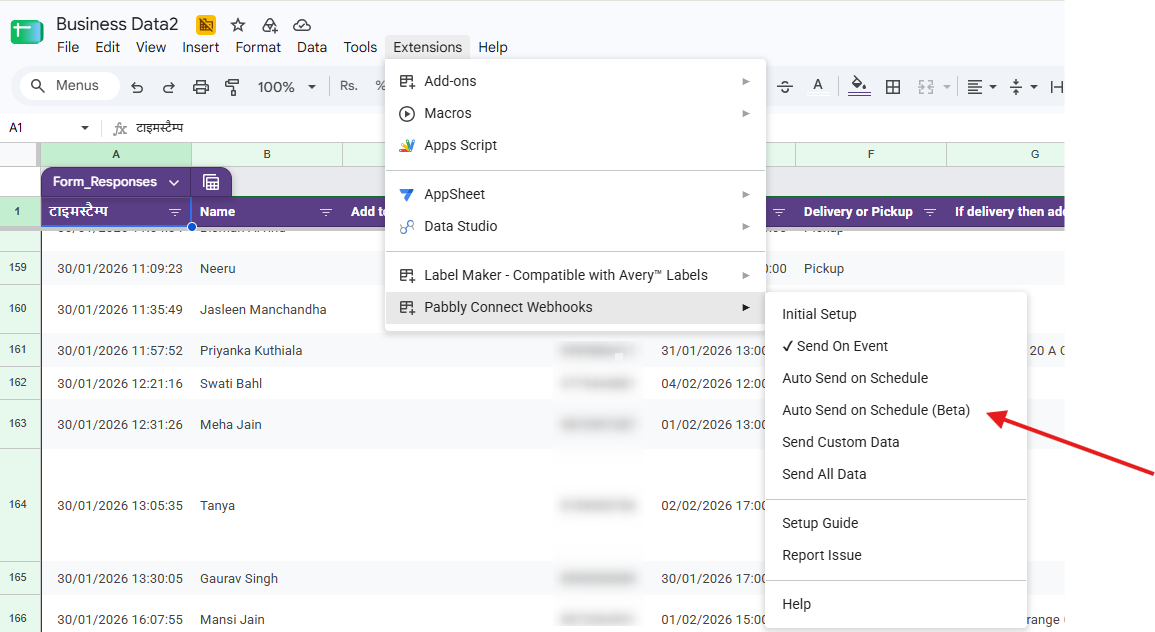
Option 2: Send Data Every Minute Using Google Apps Script
If you want newly added rows to be sent to Pabbly Connect every minute instead of every hour, you can implement the Google Apps Script provided in our documentation.
Please follow these documentation links:
Apps Script Code:
https://docs.pabbly.com/pabbly/doc/google-sheets-1-minute-trigger.12927Step-by-Step Setup Guide:
https://docs.pabbly.com/pabbly/doc/google-sheets-1-minute-trigger-send-new-rows-in-every-1-minute.12954
Follow the instructions in the documentation to add the Apps Script to your Google Sheet and configure it to send newly added rows to your Pabbly Connect workflow every minute.
Aditya Chourey
Customer Support Associate
🌐 Pabbly.com
👉 Rate your support
Black Friday Early Access
ok thank you will check out this option
Hi Vir,
You're welcome! Please take your time to check out those options.
If you run into any issues while setting up the schedule or the Google Apps Script, please feel free to reach out—we’ll be happy to assist you further.
Aditya Chourey
Customer Support Associate
🌐 Pabbly.com
👉 Rate your support
Black Friday Early Access
Hello,
Just following up on our previous email to check if you need any further assistance from our end.
Please feel free to let us know if you have any questions or concerns. We’ll be happy to assist you.
Aditya Chourey
Customer Support Associate
🌐 Pabbly.com
👉 Rate your support
Black Friday Early Access
Hi,
We’re following up on our previous email regarding your query. As we haven’t received a response, this will be our last follow-up, and the ticket will be closed automatically.
If you still need assistance, you can email us again at support@pabbly.com to raise your concern.
Aditya Chourey
Customer Support Associate
🌐 Pabbly.com
👉 Rate your support
Black Friday Early Access