

Zoho Invoice multiple line items

Consent to Access & Modify
I authorize Pabbly Support to log in to my account and make changes to the specified workflow for troubleshooting.
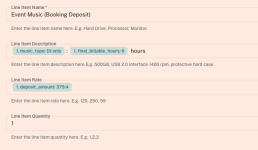
How do I add multiple line items with different quantities in the Zoho Invoice app inside a workflow? Eg: Line Item 1 - 4 chairs / Line Item 2 - 10 tables
There is only 1 line item, including 1 quantity box.
 

Attachments

  • Screen Shot 2026-01-07 at 3.25.28 pm.png
    Screen Shot 2026-01-07 at 3.25.28 pm.png
    44.9 KB · Views: 5

Preeti Paryani

Well-known member
Staff member
Hello @soundslikemichael,

Thank you for reaching out.

To create a Zoho Invoice with multiple line items, please enter comma-separated values in the line-item fields, as mentioned in the help text.

For example:

  • Item names: chairs, tables
  • Quantities: 4, 10
Please ensure that all line-item–related fields contain the same number of comma-separated values. If there are three line items, each related field must also have three values.

Let us know if you need any further assistance.

1767779109360.png
 
Top