

Zoho Invoice multiple line items

Status
Not open for further replies.
Consent to Access & Modify
I authorize Pabbly Support to log in to my account and make changes to the specified workflow for troubleshooting.
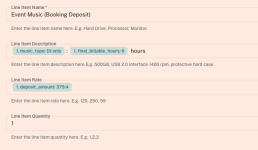
How do I add multiple line items with different quantities in the Zoho Invoice app inside a workflow? Eg: Line Item 1 - 4 chairs / Line Item 2 - 10 tables
There is only 1 line item, including 1 quantity box.
 

Attachments

  • Screen Shot 2026-01-07 at 3.25.28 pm.png
    Screen Shot 2026-01-07 at 3.25.28 pm.png
    44.9 KB · Views: 14

Preeti Paryani

Well-known member
Staff member
Hello @soundslikemichael,

Thank you for reaching out.

To create a Zoho Invoice with multiple line items, please enter comma-separated values in the line-item fields, as mentioned in the help text.

For example:

  • Item names: chairs, tables
  • Quantities: 4, 10
Please ensure that all line-item–related fields contain the same number of comma-separated values. If there are three line items, each related field must also have three values.

Let us know if you need any further assistance.

1767779109360.png
 
Status
Not open for further replies.
Top