Workflow not capturing new response - BigCommerce New Order

ec_206

Member
Your Workflow URL
https://connect.pabbly.com/workflow/mapping/IjU3NjYwNTZiMDYzMDA0MzU1MjZlNTUzMDUxMzUi_pc
Consent to Access & Modify
I authorize Pabbly Support to log in to my account and make changes to the specified workflow for troubleshooting.
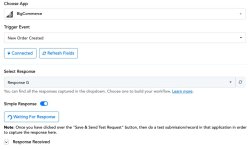
For some reason our BigCommerce > Monday.com automation isn't receiving new order response from BigCommerce when re-capturing on the first step. The automation itself is running as order data is flowing into Monday.com. I've submitted several test orders and it's stuck on G.
 

Attachments

  • BigCommerce_Monday_com___Pabbly_Connect.jpg
    BigCommerce_Monday_com___Pabbly_Connect.jpg
    67.6 KB · Views: 38

Preeti Paryani

Well-known member
Staff member
Hello @ec_206,

Could you please attempt to set up a new workflow to capture the orders from BigCommerce? If the order is successfully captured, you can copy and paste the subsequent steps from your current workflow, ensuring that you save them in the correct sequence.

P.S. Please create the workflow from scratch instead of cloning it.
 

ec_206

Member
Hi @Preeti Paryani that worked. However, when I ran a test order from BigCommerce, it seems that both the old automation and new one are both running as two Items were created in Monday.com. I have the old automation disabled (attachment) so not sure what is causing this unless the steps are tied together when I copied them from the original workflow to the new one? I don't see a way to delete the old automation.
 

Attachments

  • Dashboard___Pabbly_Connect.jpg
    Dashboard___Pabbly_Connect.jpg
    63 KB · Views: 33

Preeti Paryani

Well-known member
Staff member
Hello @ec_206,

Upon checking the workflow history, it appears that two BigCommerce orders — Order #137 and Order #138 — were processed successfully. A Monday.com item and subitem were created for each of them as expected. There doesn’t seem to be any duplicate creation in the workflow history.
 

ec_206

Member
Thanks @Preeti Paryani. We were testing this same workflow from our agency account. I deleted it and only one item is added now.

The issue now is the Subitem isn't being created. I re-captured the webhook again and went through and tested each step in the entire workflow. All lookup tables return success and no errors when I save/test the final Add SubItem action.


Preeti Paryani

Well-known member
Staff member
Hello @ec_206,

Thank you for clarifying the issue.

Upon checking, it appears that the error is occurring under the “Create Subitem” action. As shown in the attached image, certain fields are marked as required at the application level, but no data has been mapped to them.

As a result, the action failed and returned an error. Please review the error details under the response section (Res 3) to identify which specific field(s) need to be filled in to resolve the issue.

1763012760562.png
 

ec_206

Member
Thanks @Preeti Paryani after research it was the second lookup table (label > value) that I made a mistake on. Also fixed an issue with the last lookup table I found in the task history. Just ran a test order and everything worked fine.

My next question is how to handle orders with multiple products (create multiple subitems)? I watched some Pabbly training videos and it looks like data transformer and line itemizer might work for this?
 

Preeti Paryani

Well-known member
Staff member
Hello @ec_206,

Could you please elaborate on your use case? For multi-item orders, how exactly should the data be transferred to Monday.com?
 

ArshilAhmad

Well-known member
Staff member
For this use case you need to add the 'BigCommerce: Get Product by Order Id' action step after the 'Monday.com: Create Item' action step.
1763170143000.png


Display 'Simple Response' and capture the response in form of a JSON.
1763170313461.png


Then add an Iterator and a JSON Extractor to your workflow, and in the following steps, map the values from the Iterator and the JSON Extractor.
1763170362464.png


Please check out this reference workflow we have set up on your behalf. You can make similar changes in your original workflow.

Thanks & Regards,
Arshil Ahmad
Customer Support Associate
🌐 Pabbly.com
👉Rate your support
 

ec_206

Member
Hi @Preeti Paryani apologies for the late reply. I had to put this on hold to work on another task for my client's project. Anyhow, I tried following Arshil's instructions however not sure if I'm doing it right. Can you take a look. After the JSON extractor I am creating the lookup tables like I with the other automation, but it's erroring on creating the Monday subitem (last step). I also don't see all the subitem fields?


Preeti Paryani

Well-known member
Staff member
Hey @ec_206,

Could you please share a screenshot showing the Subitem fields available under the specific board and group? This will help us review it properly and assist you more effectively.
 

ec_206

Member
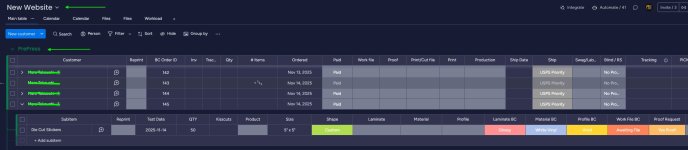
Hi @Preeti Paryani here is the screenshot of the subitem fields. You can reference our other automation which is working, but only for a single product order.
  1. Subitem (Item Name)
  2. Test Date
  3. Qty
  4. Size
  5. Shape
  6. Laminate BC
  7. Material BC
  8. Profile BC
  9. Work File BC
  10. Proof Request


    1769100438528.png
 

ArshilAhmad

Well-known member
Staff member
Thank you for sharing the field names and the screenshot. Could you please confirm that the subitem is under the board “New Website” and the group “PrePress”? If possible, please also share a larger screenshot so our technical team can look into this concern.

Thanks & Regards,
Arshil Ahmad
Customer Support Associate
🌐 Pabbly.com
👉Rate your support
 

ec_206

Member
Hi @ArshilAhmad sure thing. Attached is a larger screenshot. Yes, "New Website" > "PrePress". Note, the screenshot is from a successful test from our other automation (BigCommerce single product order).
 

Attachments

  • monday-multi-product-order-bigcommerce.jpg
    monday-multi-product-order-bigcommerce.jpg
    155 KB · Views: 11

Preeti Paryani

Well-known member
Staff member
Hey @ec_206,

Thanks for sharing the screenshots.

It looks like the subitem fields are not getting listed under the Create Subitem action (only the Item Name field is appearing). This may be occurring due to recent updates on Monday.com’s end or changes in the API response.

We have already escalated this to our technical team for further review. Once the fields start appearing again, we will verify the mapping and help you proceed accordingly.

Thanks for your patience.
 
Top