Issue in delivering emails

Status: Closed Β· Asked by vishal chanania on Β· 0 views

vishal chanania β€” Question Β·
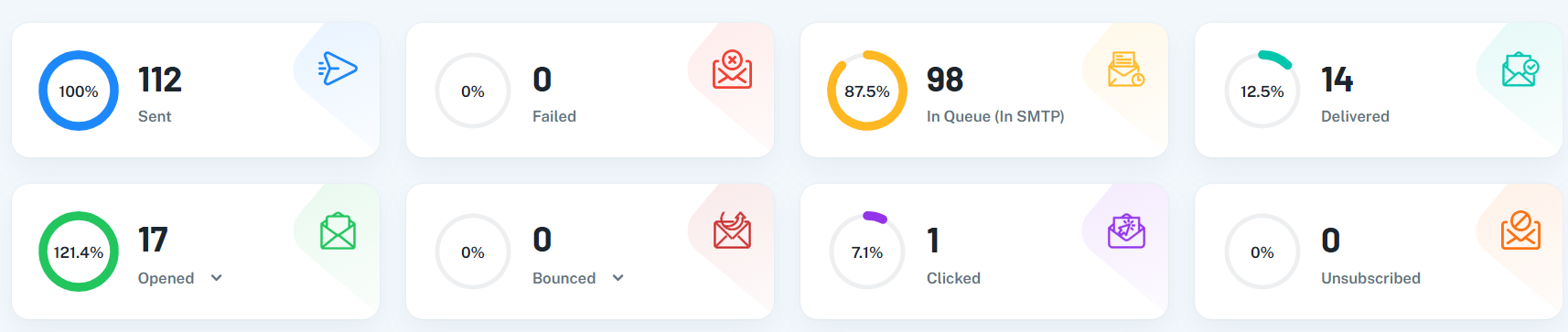
I sent a campaign on Aug 11, 2026, at 12:30:03 to around 112 subscribers. But when I saw the analytics of this campaign, as in the attached screenshot. Most of the emails are still
in the SMTP Queue, meaning they have not been delivered till today. Why??

image.png
Pabbly Support β€” Reply Β·

Hi Vishal,

Thank you for reaching out!

The emails reported as "In Queue (In SMTP)" have actually been sent out by Pabbly to your Gmail SMTP server (smtp.gmail.com). Here is why the dashboard displays them in the queue:

Why Emails Remain "In Queue (In SMTP)"

  • Gmail Webhook Limitation: Custom Gmail SMTP servers do not support external real-time delivery webhooks. Unlike dedicated email infrastructure (such as Amazon SES or Mailgun), Gmail cannot send an explicit "Delivered" status back to Pabbly once an email lands in the inbox.

  • Open/Click Tracking Inference: Pabbly tracks email opens using tracking pixels and clicks via tracking links. When a recipient opens an email or clicks a link, Pabbly automatically marks that recipient's status as Delivered.

This is why your Delivered count (14) directly mirrors your Unique Opens count (14). The remaining 98 emails were handed over to Gmail for delivery, but because Gmail doesn't return delivery webhooks and those specific recipients haven't opened the email yet, their status remains in the queue state.

If you require real-time delivery confirmation and detailed bounce reporting, we recommend switching your delivery server to Amazon SES or Pabbly (Send with Us).

Please let us know if you have any further questions!

Thanks & Regards,
Hrishabh
Customer Support Associate
🌐 Pabbly.com
πŸ‘‰ Rate your support

vishal chanania β€” Reply Β·

Ok. If I go with Pabbly (Send with Us) method. Then it's showing a message as per the attachment. I understand this message, but our official website is nandiniinfosys.com and our sender email is [email hidden]. So, how to overcome this?

image.png

Pabbly Support β€” Reply Β·

Hi Vishal,

Thank you for sharing the screenshot!

The validation rule in Pabbly (Send with Us) requires that your sender email domain matches the business domain configured in your account to prevent spoofing and ensure domain verification compliance.

Since your business website is nandiniinfosys.com but your official sender email uses nandiniinfosys.in, here is how you can resolve this:

Option 1: Update Your Business Domain in Pabbly

If nandiniinfosys.in is primary for your email communication, update the Business Website / Domain field in your Pabbly Email Marketing settings/profile from nandiniinfosys.com to nandiniinfosys.in. Once updated, the system will allow you to add and verify [email hidden] without throwing the mismatch error.

Option 2: Create an Email Alias / Address on .com

Alternatively, you can create a sender email address on your .com domain (such as [email hidden] or [email hidden]) and add that as your verified sender address in Pabbly (Send with Us).

Please update your account domain settings to match your .in domain, and you will be able to proceed with adding [email hidden].

Let us know if you run into any issues during setup!

Thanks & Regards,
Hrishabh
Customer Support Associate
🌐 Pabbly.com
πŸ‘‰ Rate your support

vishal chanania β€” Reply Β·

ok. If I choose option 1 and update my business website to a nandiniinfosys.in domain, then it's shown on templates as well. That I don't want. I want to show a .com domain on templates.

Pabbly Support β€” Reply Β·

Hi Vishal,

Thank you for clarifying!

The domain listed in your Business Details is directly used both for verifying sender emails in Pabbly (Send with Us) and for populating the footer link across your email templates.

Since the system enforces domain matching for verification, your sender email domain and the business website domain must match.

To use [email hidden] as your sender email in Pabbly (Send with Us), you will need to update your Business Website setting to nandiniinfosys.in. Currently, there isn't a separate setting to display .com in the template footer while keeping .in for sender email verification.

Thanks & Regards,
Hrishabh
Customer Support Associate
🌐 Pabbly.com
πŸ‘‰ Rate your support

Signature image

Pabbly Support β€” Reply Β·

Hello Vishal,

I hope you are doing well.

This is a follow-up regarding your query about using [email hidden] as the sender email while keeping nandiniinfosys.com as the business website displayed in your email templates.

As mentioned earlier, the sender email domain and the business website domain need to match for verification in Pabbly (Send with Us). Currently, there is no separate setting that allows you to use the .in domain for sender verification while displaying the .com domain in the template footer.

Please let us know if you have any further questions or need any assistance with the available options.


On Aug 12, 2026, 7:21 AM, Hrishabh Tiwari <support@pabbly.com> wrote:

Hi Vishal,

Thank you for clarifying!

The domain listed in your Business Details is directly used both for verifying sender emails in Pabbly (Send with Us) and for populating the footer link across your email templates.

Since the system enforces domain matching for verification, your sender email domain and the business website domain must match.

To use [email hidden] as your sender email in Pabbly (Send with Us), you will need to update your Business Website setting to nandiniinfosys.in. Currently, there isn't a separate setting to display .com in the template footer while keeping .in for sender email verification.

Thanks & Regards,
Hrishabh
Customer Support Associate
🌐 Pabbly.com
πŸ‘‰ Rate your support

Signature image


Thanks and Regards,
Preeti Paryani
Customer Success Associate,
Pabbly.com

Signature image
Pabbly Support β€” Reply Β·

Hello Vishal,

I hope you are doing well.

This is a follow-up regarding your query about using [email hidden] as the sender email while keeping nandiniinfosys.com as the business website displayed in your email templates.

As mentioned earlier, the sender email domain and the business website domain need to match for verification in Pabbly (Send with Us). Currently, there is no separate setting that allows you to use the .in domain for sender verification while displaying the .com domain in the template footer.

Please let us know if you have any further questions or need any assistance with the available options.


On Aug 16, 2026, 7:49 AM, Preeti Paryani <support@pabbly.com> wrote:

Hello Vishal,

I hope you are doing well.

This is a follow-up regarding your query about using [email hidden] as the sender email while keeping nandiniinfosys.com as the business website displayed in your email templates.

As mentioned earlier, the sender email domain and the business website domain need to match for verification in Pabbly (Send with Us). Currently, there is no separate setting that allows you to use the .in domain for sender verification while displaying the .com domain in the template footer.

Please let us know if you have any further questions or need any assistance with the available options.


On Aug 12, 2026, 7:21 AM, Hrishabh Tiwari <support@pabbly.com> wrote:

Hi Vishal,

Thank you for clarifying!

The domain listed in your Business Details is directly used both for verifying sender emails in Pabbly (Send with Us) and for populating the footer link across your email templates.

Since the system enforces domain matching for verification, your sender email domain and the business website domain must match.

To use [email hidden] as your sender email in Pabbly (Send with Us), you will need to update your Business Website setting to nandiniinfosys.in. Currently, there isn't a separate setting to display .com in the template footer while keeping .in for sender email verification.

Thanks & Regards,
Hrishabh
Customer Support Associate
🌐 Pabbly.com
πŸ‘‰ Rate your support

Signature image


Thanks and Regards,
Preeti Paryani
Customer Success Associate,
Pabbly.com

Signature image

Thanks and Regards,
Preeti Paryani
Customer Success Associate,
Pabbly.com

Back to all forum threads Β· Log in to reply