Tags not showing on individual email profile

Status: Closed · Asked by Michael Turner on · 0 views
Michael Turner — Question ·
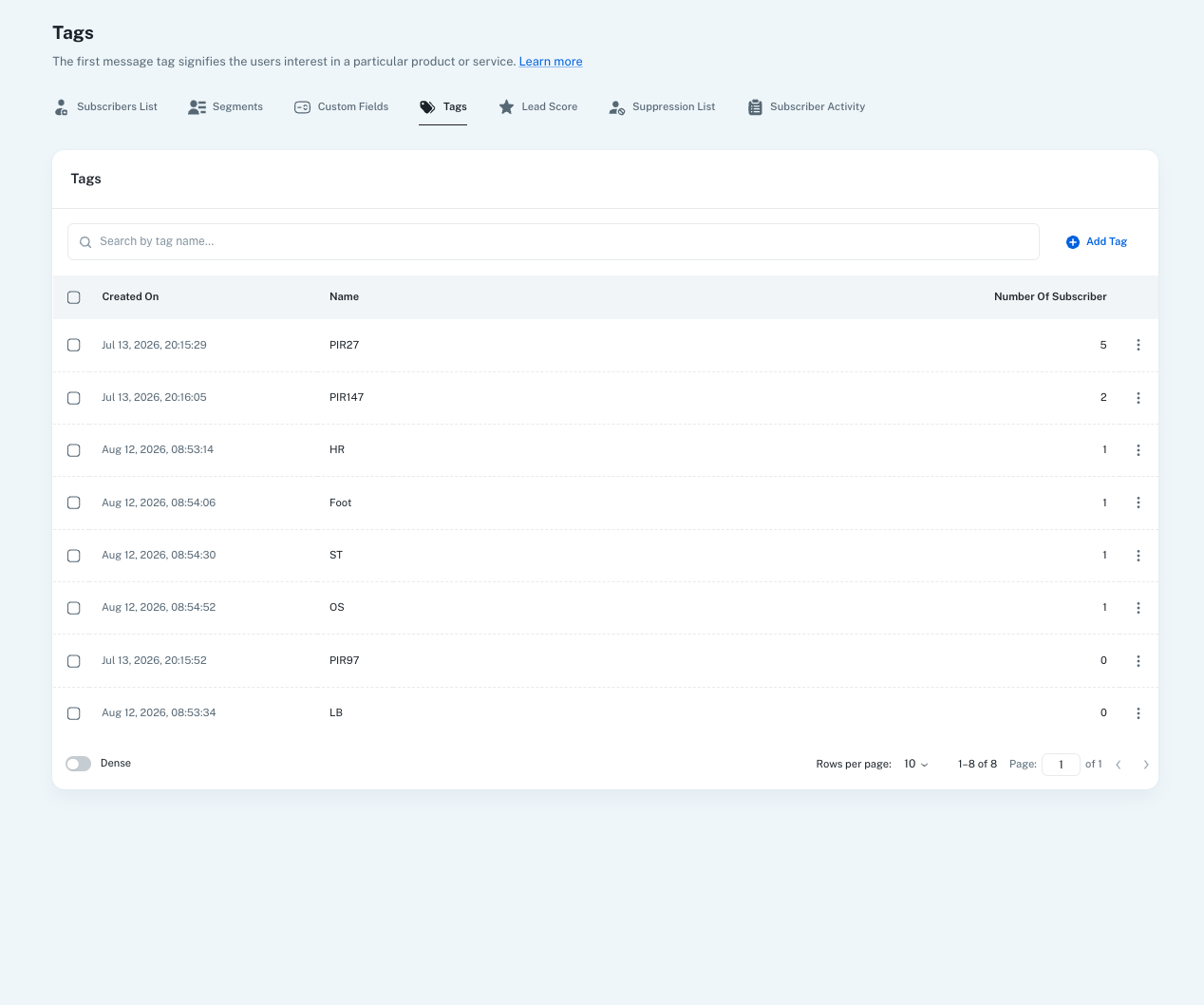
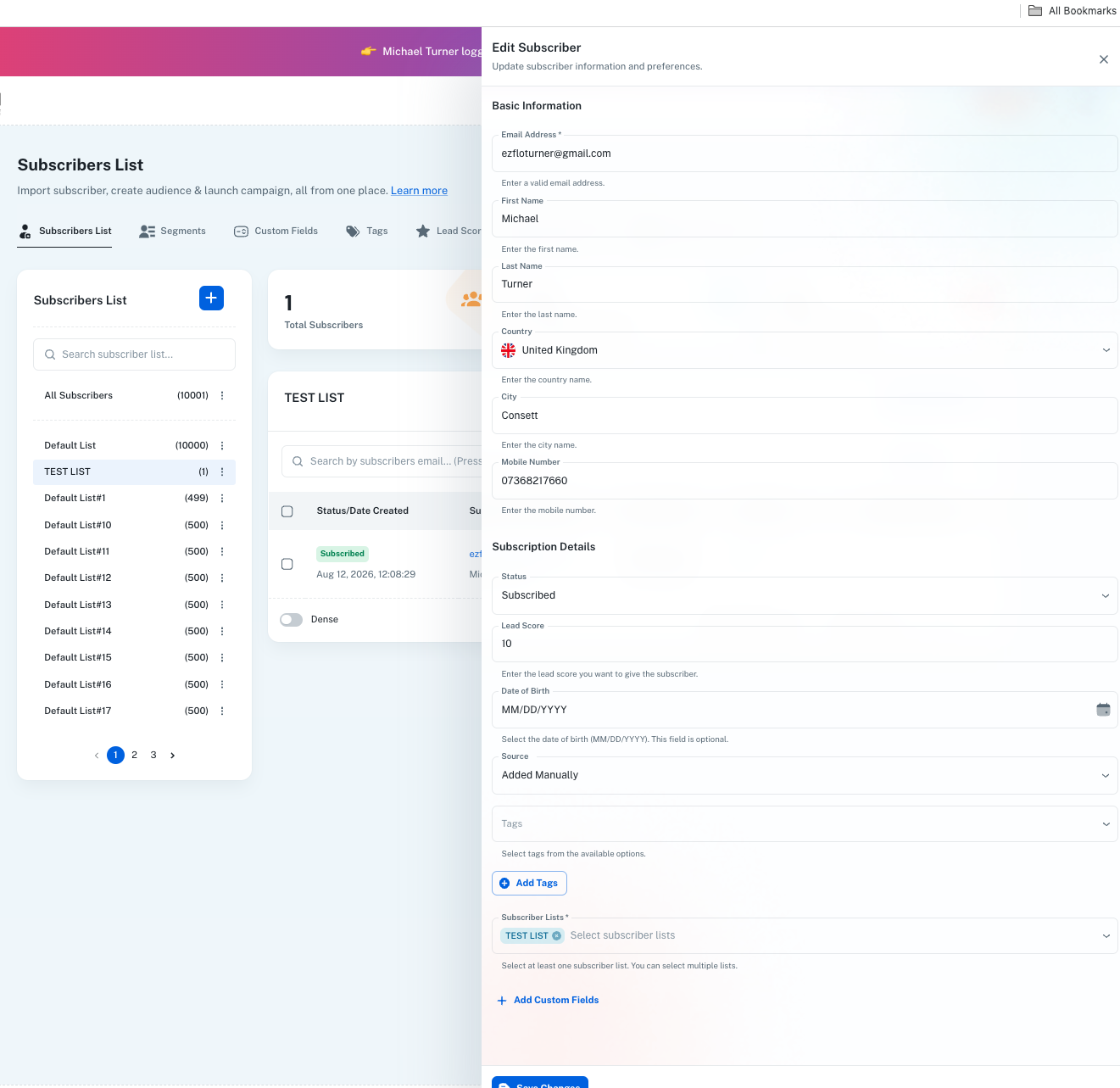
Hi ive set up and worked on campaigns set the targets the lists the tags for the email;

 Sent them tested the links and the clicks which should have tagged the email address and be shown in the email profile but they are not!

Tags have shown to fire in the workflow but on another test email they did not show up so im confused i can see them in the overall history although the last one didnt record.
tag profile individual email.43.png
tags12.27.05.png
Pabbly Support — Reply ·

Hello Michael,

Thank you for reaching out to us and for sharing the screenshots.

To better understand the issue, could you please clarify what exactly you mean by the tags not appearing?

Are you saying that the tags were supposed to be added to the subscriber but were not added, or that the tags were added but are not appearing in the subscriber's profile/activity?

Also, please share the following details so that we can check how the tags are being added:

  • How were the tags being added — through Pabbly Connect, Pabbly Chatflow, or another workflow/automation?

  • What were the exact tags that were expected to be added?

  • The workflow/flow name responsible for adding the tags.

  • If possible, please share the workflow/flow link or the relevant action step where the tags are being added.

Once we have these details, we can check the configuration and execution logs and assist you further.


On Aug 12, 2026, 11:44 AM, Michael Turner <[email hidden]> wrote:
Hi ive set up and worked on campaigns set the targets the lists the tags for the email;

 Sent them tested the links and the clicks which should have tagged the email address and be shown in the email profile but they are not!

Tags have shown to fire in the workflow but on another test email they did not show up so im confused i can see them in the overall history although the last one didnt record.
tag profile individual email.43.png
tags12.27.05.png

Thanks and Regards,
Preeti Paryani
Customer Success Associate,
Pabbly.com
Michael Turner — Reply ·

Hi yes, so the tags as shown did not appear on the individual (my email for testing profile) so on this test i clicked HR and that tag should have been applied to my email address but it doesn't show!

So you can see let me explain i added a new email address mine to send a test, in the email four choices (buttons) so to test the links

I click all four buttons in the email which should have then added four tags to my email address...

but when i checked the profile nothing however it shows in the history they fired...

now i then deleted that email as i cant load any more added a new email (mine again) and did the test again this time i just clicked one link button HR which should have just added the one tag HR to my profile, nothing there? but also it never recorded on this auto workflow...!

now is this because i duplicated the original email to send to a different email address?

As thats another issues to solve.. but mainly why are the tags firing but not showing or segmenting the email i send to and adding the tag?

thanks

Michael

workflow08-12 at 12.57.11.png

Im using workflow

Pabbly Support — Reply ·

Hello Michael,

Thank you for clarifying the issue.

To help us check this further, could you please share the email address registered with your Pabbly account?

Also, when you selected the tags while configuring the workflow, could you please confirm whether you clicked “Save Changes” after selecting the required tags?

Once you share the registered Pabbly account email address and confirm the above, we can check the workflow configuration and investigate the issue further.

Thanks and Regards,
Preeti Paryani
Customer Success Associate,
Pabbly.com
Michael Turner — Reply ·

Hi yes, the email shoul dbe [email hidden] thats me.

Also yes i definitely clicked save changes in the tags, im not sure it would have recorded anything as per the images i've uploaded if i hadn't? Its prob something I have done wrong but i had chat gpt to help me navigate it all. And then like i say it seemed to work and tag but not the actual email which is the whole point so i can have separate lists tagged.

thank you

Pabbly Support — Reply ·

Hey,

Unfortunately, we are unable to find any workflow within the Pabbly Email Marketing account associated with this email address: [email hidden]. Please share the correct email address associated with your Pabbly account so we can assist you accordingly.


On Aug 13, 2026, 8:02 AM, Michael Turner <[email hidden]> wrote:

Hi yes, the email shoul dbe [email hidden] thats me.

Also yes i definitely clicked save changes in the tags, im not sure it would have recorded anything as per the images i've uploaded if i hadn't? Its prob something I have done wrong but i had chat gpt to help me navigate it all. And then like i say it seemed to work and tag but not the actual email which is the whole point so i can have separate lists tagged.

thank you


Thanks and Regards,
Preeti Paryani
Customer Success Associate,
Pabbly.com

Signature image
Whizzinator The — Reply ·

Michael Turner:
Hi ive set up and worked on campaigns set the targets the lists the tags for the email; Sent them tested the links and the clicks which should have tagged the email address and be shown in the email profile but they are not!Tags have shown to fire in the workflow but on another test email they

I have seen this happen when the tag is firing in the workflow but the contact profile is not updating correctly. I would first check whether the tag is being applied to the same email address as the test contact and whether the workflow action is completing successfully. It may also be worth checking the contact activity history to confirm when the tag was added. If it appears there but not on the profile, it could be a display or syncing issue.

Pabbly Support — Reply ·

Hello,

Thank you for sharing the details.

Could you please provide some proof of the issue, such as a screenshot or screen recording (screencast) showing the workflow execution and the contact profile where the tag is not appearing?

This will help us verify whether the tag is being applied successfully and investigate the issue further.

Thanks and Regards,
Preeti Paryani
Customer Success Associate,
Pabbly.com

Signature image
Michael Turner — Reply ·

I have included the scrrenshots in the previous chats in this ticket.. this is my account login email [email hidden] im logged in through the irace vision account if that helps

Pabbly Support — Reply ·

Hello Michael,

Thank you for sharing the additional details.

We have tested the tagging functionality for subscribers from our end, and it is working as expected. The tags are being successfully added to the subscriber profiles.

Based on this, it is possible that the issue you experienced was related to a temporary cache or display issue on your end.

Could you please try clearing your browser cache/cookies or opening Pabbly in an Incognito/Private window, and then test the tagging functionality again?

Please let us know how it goes after testing. If the issue persists, share a screenshot or screencast of the latest test, and we’ll investigate it further.

Thanks and Regards,
Preeti Paryani
Customer Success Associate,
Pabbly.com

Signature image

Back to all forum threads · Log in to reply