Too Many Requests / API Rate Limit on WhatsApp Messages
Status: Open · Asked by Techno Mayank on · 0 views
Hi Pabbly Team,
I am using Pabbly Connect + Pabbly Chatflow to schedule WhatsApp messages for our communications.
All our messages are time-specific and scheduled, and we are sending them to multiple leads through Pabbly Connect/Chatflow.
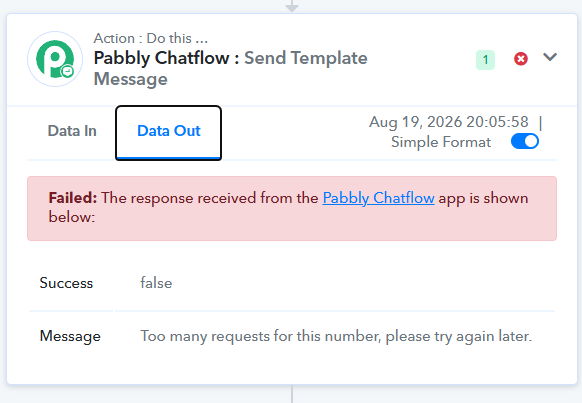
However, we are frequently getting failures for some numbers with the following error:
"Too many requests for this number, please try again later."
I have attached a screenshot of one such failure for reference.
What is confusing is that we are not firing all the API requests simultaneously.
We have already implemented the following best practices:
Added a random delay of a few minutes between individual leads.
Ensured that messages are not triggered for all leads at exactly the same time.
Spread the API calls across time instead of sending them in a single burst.
We are already trying to control the request frequency from our Pabbly Connect workflow.
Despite this, we are still seeing this error on a few leads.
My questions:
What exactly is the API/rate limit causing this error?
Is this limit imposed by:
Pabbly Chatflow?
Pabbly Connect?
What is the exact limit?
Please share the applicable limit in terms of:
Requests per second/minute
Messages per minute/hour
Per WhatsApp sender number
Any rolling-window restriction
If the restriction is from Pabbly's side, is there any way to increase or optimize this rate limit?
Does Pabbly Chatflow have any internal queue/throttling mechanism that we should be aware of? If yes, what is the queue capacity and processing rate?If we are already adding random delays between leads, what additional optimization can we implement to prevent these failures?
We are using Pabbly specifically for scheduled WhatsApp communication, so occasional failures due to rate limiting are a significant issue for us.
I also noticed that other WhatsApp API/BSP platforms seem to support higher sending throughput, so I would like to understand whether this is a Meta-imposed limitation or a Pabbly-specific limitation.
If this is a Pabbly-specific restriction, it would be helpful to know whether there is a higher-throughput option or any recommended configuration for high-volume scheduled messaging.
Task History ID
IjU3NjYwNTZjMDYzZjA0MzU1MjZhNTUzNzUxMzU1MTYzNTQzNjBmMzgi_pc[email hidden]
Account -
Please check the above task history and let me know exactly why the request was rejected and which rate limit was hit.
I would appreciate a detailed technical explanation rather than a generic "try again later" response, as we have already implemented delays and other standard rate-limiting practices.
Thanks.
Another task IDs
Task History ID -
IjU3NjYwNTZjMDYzZjA0MzU1MjZhNTUzNzUxMzU1MTYzNTQzNjBmMzgi_pc
IjU3NjYwNTZjMDYzZjA0MzU1MjY5NTUzNzUxMzA1MTY0NTQzOTBmMzYi_pc
Hello,
Thank you for sharing the screenshot.
Upon checking the error, it appears that you are hitting the Pabbly Chatflow API rate limit. The message “Too many requests for this number, please try again later” indicates that multiple messages were attempted to be sent via the API to the same number within the same second.
Although you have added delays between your leads, please ensure that multiple API requests are not being triggered for the same number at the same time. We recommend using Delay after queue instead of Delay For.
We recommend spacing out the API requests further to avoid triggering the rate limit. This should help prevent the error and allow the messages to be processed successfully.