Trouble in connecting MySQL with Pabbly Connect

Hi,

I'm facing trouble in making connection in MySQL trigger with the available credentials.

Ive 2 things to ask -
  1. Is Database username and MySQL username the same (client has provided me MySql u/name) ?
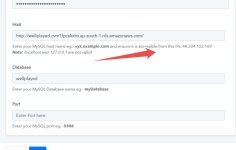
  2. What does accessible IP address (as written in help text) mean ? How do I do it ?
I am stuck in this step itself. Is there something which i am missing ?

Need guidance pls
 

Attachments

  • annotely_image (9).jpeg
    annotely_image (9).jpeg
    36.9 KB · Views: 161
P

PabblyMember4

Guest
Hey @Kaustubhdixit

1. You must provide a MySql Database username and password in the field.

2. You must check if your host is accessible from the IP address mentioned in the help text. Kindly enter the hostname correctly to ensure you get a proper connection.
 
Hello

Iam still not being able to connect to MySql - as per your instructions above.
I downloaded Workbench , but not able to understand how to get started.

The app developer is saying all available & required credentials have already been provided to me.

When i am trying to connect Mysql with Pabbly .....error window is showing .... Invalid credentials or host or database or port

Can you please help in this ?
 
P

Pabblymember11

Guest
Hey @Kaustubhdixit

Can you please confirm that you have passed the port number correctly as mentioned in the help text on the connection page?

Also, please refer to the following video tutorial on how you can connect the MYSQL action step.


If the issue still persists then kindly capture a short video on how you are connecting your MYSQL.
 
Top