Urgent: WhatsApp Template Messages Failing in Pabbly Chatflow
Status: Open · Asked by Anjali koli on · 0 views
Hi Pabbly Team,
We are currently facing an urgent issue with WhatsApp template messages in Pabbly Chatflow.
Whenever we try to send an approved template, the message fails with the following error:
Error (#131042): Message failed to send because your WhatsApp Business Account currency is not configured.
Because of this issue, our automated WhatsApp messages are not being delivered to customers.
Could you please urgently check our setup and guide us on:
Where exactly the issue is occurring
How we can configure/fix the WhatsApp Business Account currency
Whether any billing or Meta Business Account settings need to be changed
Whether we need to reconnect the WhatsApp Business Account with Pabbly Chatflow after fixing it
How we can re-test the template once the issue is resolved
I have also attached a screenshot of the error for reference.
This is affecting our live automation, so we would appreciate a quick resolution.
If possible, can we connect over a Google Meet so your team can check the setup with us and help resolve the issue quickly?
Please let us know the earliest available time.
Thank you.
Hello,
Thank you for reaching out and for sharing the error details.
Error (#131042) - "Message failed to send because your WhatsApp Business account currency is not configured" is a Meta (WhatsApp) side error related to your WhatsApp Business Account (WABA) billing/payment configuration, not an issue within Pabbly itself.
To resolve this, please verify the following in your Meta Business Manager- https://business.facebook.com/latest/settings/whatsapp_account / WhatsApp Business setup:
1. Payment method: Ensure a valid payment method is added and verified under Billing and Payment Settings.
2. Currency and timezone: Set these correctly in your Meta Business settings (the error specifically references currency not being configured).
3. Credit line: Confirm your credit line is active and not exceeded.
4. WABA status: Make sure your WhatsApp Business Account is active and not restricted or suspended, and is linked to the billing account.
5. GST / tax details: Adding applicable tax info in the billing section is mandatory.
6. Business verification: Complete Meta's business verification with the required documents.
Once the payment method and currency are properly configured and verified on Meta's side, template/broadcast sends will resume automatically. There is no need to reconnect your WhatsApp Business Account with Pabbly Chatflow after fixing this, since the change is on Meta's side.
After completing the above, please retest with a single number and share a screenshot of the broadcast status if the issue still persists, so we can investigate further.
If you would still like to connect over a call to review the setup together, please let us know and we can arrange one.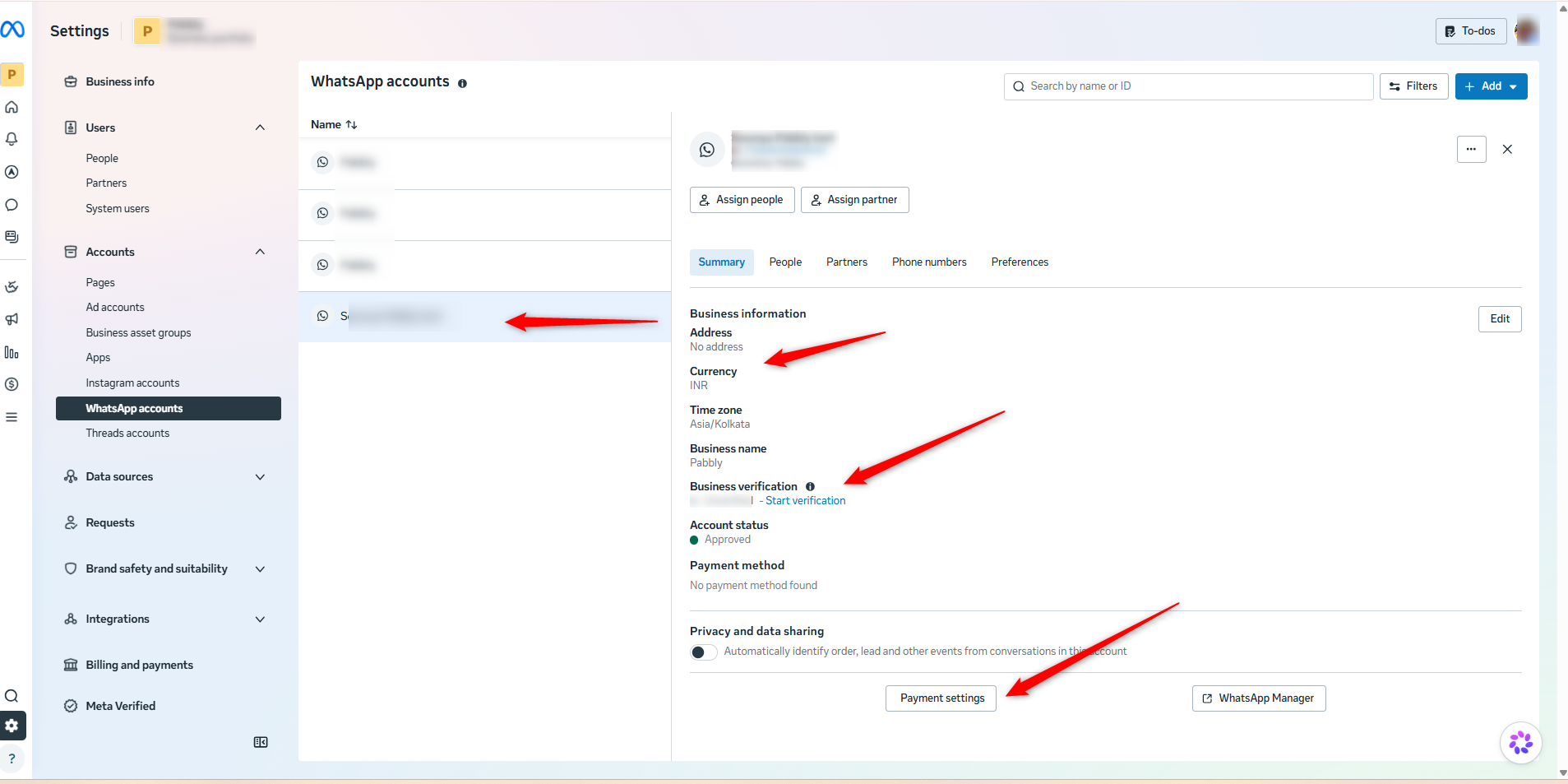
Thanks & Regards,
Soumya Tripathi
Customer Support Lead
🌐 Pabbly.com