

-
Instructions to Ask a Question
For any assistance, please click the "Ask a Question" button and select the Pabbly product for which you require support.
We offer seven comprehensive applications designed to help you efficiently manage and grow your business:
- Pabbly Connect
- Pabbly Subscription Billing
- Pabbly Email Marketing
- Pabbly Form Builder
- Pabbly Email Verification
- Pabbly Hook
- Pabbly Chatflow
Our support team endeavors to respond within 24 business hours (Monday to Friday, 10:00 AM to 6:00 PM IST). We appreciate your understanding and patience.
-

You are using an out of date browser. It may not display this or other websites correctly.
You should upgrade or use an alternative browser.
You should upgrade or use an alternative browser.
Workflow not capturing new response - BigCommerce New Order
- Thread starter ec_206
- Start date
- Status
- Not open for further replies.
Awesome! Thank you @Preeti Paryani. I will test today.

Sure, do let us know how it goes.
Thanks & Regards,
Arshil Ahmad
Customer Support Associate
 Pabbly.com
 Rate your support
Thanks & Regards,
Arshil Ahmad
Customer Support Associate
Pabbly.comRate your supportHi @Preeti Paryani and @ArshilAhmad good news it worked! My next step is to figure out how to check the BigCommerce order for certain product ID's and only add subitems for them. No all products will be added to Monday.com.
Attachments

Hi @ec_206,
Thank you for the update. Glad to know that it worked successfully.
Regarding your next requirement, could you please help us with a bit more clarity on the exact use case so we can guide you more accurately?
Specifically, it would be helpful to understand:
Once you share the complete flow and expected outcome, we will be able to suggest the correct workflow structure and assist you further.
Thank you for the update. Glad to know that it worked successfully.
Regarding your next requirement, could you please help us with a bit more clarity on the exact use case so we can guide you more accurately?
Specifically, it would be helpful to understand:
- Are you planning to use BigCommerce – New Order or New Product as the trigger?
- Do you want to apply any specific filter or criteria (such as product IDs) so that only selected products are processed?
- At what stage do you want the item or subitem to be created in Monday.com?
- Will you first be searching for an existing item in Monday.com under which the subitem should be created, or should it be created directly?
Once you share the complete flow and expected outcome, we will be able to suggest the correct workflow structure and assist you further.
Hi @Preeti Paryani. Our client confirmed they want "all" products in an order as subitems so you can disregard my previous message.
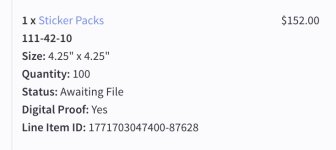
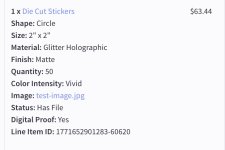
We are having issues with one of their products in particular "Sticker Packs". I've attached an image of the order information. You'll notice "Sticker Packs" don't have as many fields the other products have.
Sticker Packs
We are having issues with one of their products in particular "Sticker Packs". I've attached an image of the order information. You'll notice "Sticker Packs" don't have as many fields the other products have.
Sticker Packs
- Size
- Quantity
- Status
- Digital Proof
- Shape
- Size
- Material
- Finish
- Quantity
- Color Intensity
- Status
- Digital Proof
Attachments
Last edited:
Could you please share the Workflow URL where you have this concern?Hi @Preeti Paryani. Our client confirmed they want "all" products in an order as subitems so you can disregard my previous message.
We are having issues with one of their products in particular "Sticker Packs". I've attached an image of the order information. You'll notice "Sticker Packs" don't have as many fields the other products have.
Sticker Packs
Die Cut Stickers, Kiss Cut Stickers, Sticker Sheet, Specialty Stickers
- Size
- Quantity
- Status
- Digital Proof
A single order can have any combinations of these products, however it seems that if "Sticker Packs" is one of the items the automation is breaking after adding the Monday.com > Create Item step. My guess is it may be erroring when trying to create the lookup tables since there are none of those fields for that product (Sticker Packs)? Maybe put a filter before each lookup table to check for that field?
- Shape
- Size
- Material
- Finish
- Quantity
- Color Intensity
- Status
- Digital Proof
Thanks & Regards,
Arshil Ahmad
Customer Support Associate
Pabbly.comRate your supportHi @ArshilAhmad here is the WF URL - https://connect.pabbly.com/v2/app/workflow/mapping/IjU3NjcwNTZkMDYzNjA0MzQ1MjZmNTUzMjUxMzEi_pc
Here is the last task ID for this workflow - IjU3NjUwNTY0MDYzNTA0MzM1MjZhNTUzNjUxMzQ1MTYwNTQzNTBmMzUi_pc
Thank you!
- Marc
Here is the last task ID for this workflow - IjU3NjUwNTY0MDYzNTA0MzM1MjZhNTUzNjUxMzQ1MTYwNTQzNTBmMzUi_pc
Thank you!
- Marc
Hi Marc,
Thanks for sharing the workflow details.
First, please try this quick fix before making structural changes:
If the failure is only due to missing fields (like Shape, Material, Finish, etc.), enabling Ignore Error should allow the workflow to continue without breaking.

If the issue still persists, then we recommend restructuring the flow using a Router after the Iterator:
Thanks for sharing the workflow details.
First, please try this quick fix before making structural changes:
- Go to the Create Subitem (Monday.com) step.
- Click on the three dots.
- Enable Ignore Error.
- Run a test with an order that includes “Sticker Packs”.
If the failure is only due to missing fields (like Shape, Material, Finish, etc.), enabling Ignore Error should allow the workflow to continue without breaking.
If the issue still persists, then we recommend restructuring the flow using a Router after the Iterator:
- Route 1: Add a filter where extended fields (e.g., Shape) exist → run all lookup steps → create subitem.
- Route 2: Add a filter where extended fields do not exist (Sticker Packs) → do not unnecessary lookups → create subitem with only available fields.
Great thanks @Preeti Paryani. I will try the ignore error message and let you know.
Hi @Preeti Paryani I enabled ignore error and ran a couple tests. The first was an order with a Die Cut Stickers and Sticker Pack. The iterator ran, but only added the Die Cut Stickers subitem, not the Sticker Pack. The second test order was just a Sticker Pack and it didn't add the subitem.
Hi @ec_206,
Thank you for the update.
As mentioned earlier, if enabling Ignore Error is not working as expected in your case, we recommend restructuring the workflow as suggested in my previous reply. This will help avoid dependency-related skips and ensure the steps execute more reliably.
Please implement the suggested structure and let us know if you need any further assistance.
Thank you for the update.
As mentioned earlier, if enabling Ignore Error is not working as expected in your case, we recommend restructuring the workflow as suggested in my previous reply. This will help avoid dependency-related skips and ensure the steps execute more reliably.
Please implement the suggested structure and let us know if you need any further assistance.
If the issue still persists, then we recommend restructuring the flow using a Router after the Iterator:
- Route 1: Add a filter where extended fields (e.g., Shape) exist → run all lookup steps → create subitem.
- Route 2: Add a filter where extended fields do not exist (Sticker Packs) → do not unnecessary lookups → create subitem with only available fields.
Perfect thanks @Preeti Paryani. I will add the filters and let you know how it goes.
It is not allowing me to add a Router step after the iterator. I'm seeing a message "Router can only be added at an end of a workflow".
Disregard Preeti. I figured out out to restructure. Needed to delete all actions after the iterator, then add the router.
It is not allowing me to add a Router step after the iterator. I'm seeing a message "Router can only be added at an end of a workflow".
Disregard Preeti. I figured out out to restructure. Needed to delete all actions after the iterator, then add the router.
Last edited:
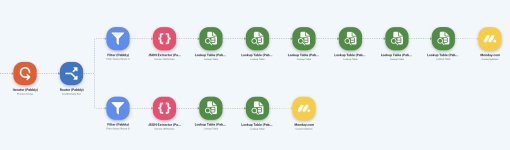
Hi @Preeti Paryani. I think I'm getting close. Attached is a screenshot of the new automation with Router. I cloned the original one. The issue now is it's creating a duplicate Parent Item, then duplicate Sticker Pack subitem? Only one workflow is active so I don't think this is the issue on the duplicate parent creation.
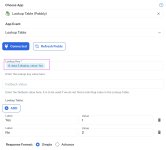
You'll also notice the Sticker Pack route uses a couple of the same lookup tables as the other filter route however the "Lookup key" is different based on the product.
Here is the new automation: https://connect.pabbly.com/v2/app/workflow/mapping/IjU3NjcwNTZjMDYzZjA0MzM1MjZjNTUzNTUxMzQi_pc
You'll also notice the Sticker Pack route uses a couple of the same lookup tables as the other filter route however the "Lookup key" is different based on the product.
Here is the new automation: https://connect.pabbly.com/v2/app/workflow/mapping/IjU3NjcwNTZjMDYzZjA0MzM1MjZjNTUzNTUxMzQi_pc
Attachments
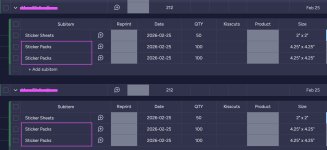
Hi @Preeti Paryani I believe it's this one. IjU3NjUwNTY0MDYzMjA0Mzc1MjZjNTUzMjUxMzA1MTYwNTQzNjBmMzci_pc
Based on your Task History, we can see that your workflow is executing twice for the same order.
 Task History ID - IjU3NjUwNTY0MDYzMjA0Mzc1MjZjNTUzMjUxMzA1MTYwNTQzNjBmMzci_pc
Task History ID - IjU3NjUwNTY0MDYzMjA0Mzc1MjZjNTUzMjUxMzA1MTYwNTQzNjBmMzgi_pc

The issue occurs when a user clicks the “Save & Send Test Request” button multiple times in a post webhook–based trigger step. Since the BigCommerce trigger step is based on post webhooks, clicking the “Save & Send Test Request” button multiple times can cause this issue.
To fix this, we suggest that you clone your workflow, disable the existing workflow, and set up BigCommerce as the trigger step again in the new workflow. This will ensure that your workflow is triggered only once.

Thanks & Regards,
Arshil Ahmad
Customer Support Associate
Pabbly.com
Rate your support
BigCommerce Payload
BigCommerce Payload - { "store_id": "1003326169", "scope": "store/order/created", "producer": "stores/sj7pp0cf
www.diffchecker.com
Task History ID - IjU3NjUwNTY0MDYzMjA0Mzc1MjZjNTUzMjUxMzA1MTYwNTQzNjBmMzgi_pc
The issue occurs when a user clicks the “Save & Send Test Request” button multiple times in a post webhook–based trigger step. Since the BigCommerce trigger step is based on post webhooks, clicking the “Save & Send Test Request” button multiple times can cause this issue.
To fix this, we suggest that you clone your workflow, disable the existing workflow, and set up BigCommerce as the trigger step again in the new workflow. This will ensure that your workflow is triggered only once.
Thanks & Regards,
Arshil Ahmad
Customer Support Associate
Pabbly.comRate your supportThanks @ArshilAhmad just to make sure, I cloned the workflow. Do I now click "Save & Send Test Request" in the trigger? It says the hook already exists? Let me know what I should do.
Actually, I'm going to have our client delete the old inactive workflows.

Actually, I'm going to have our client delete the old inactive workflows.
Last edited:
Yes, but make sure you click it only once and then capture a new order.
Thanks & Regards,
Arshil Ahmad
Customer Support Associate
Pabbly.com
Rate your support
Thanks & Regards,
Arshil Ahmad
Customer Support Associate
Pabbly.comRate your supportOk thanks for confirming @ArshilAhmad
- Status
- Not open for further replies.
Similar threads

- Replies
- 2
- Views
- 325


- Replies
- 5
- Views
- 1K


