Facebook Lead Ads mapped dynamic fields showing sample text/field names instead of actual values in Google Sheets
Status: Closed · Asked by Shabbir Ads Analytics Solutions on · 0 views
Hi Pabbly Support Team,
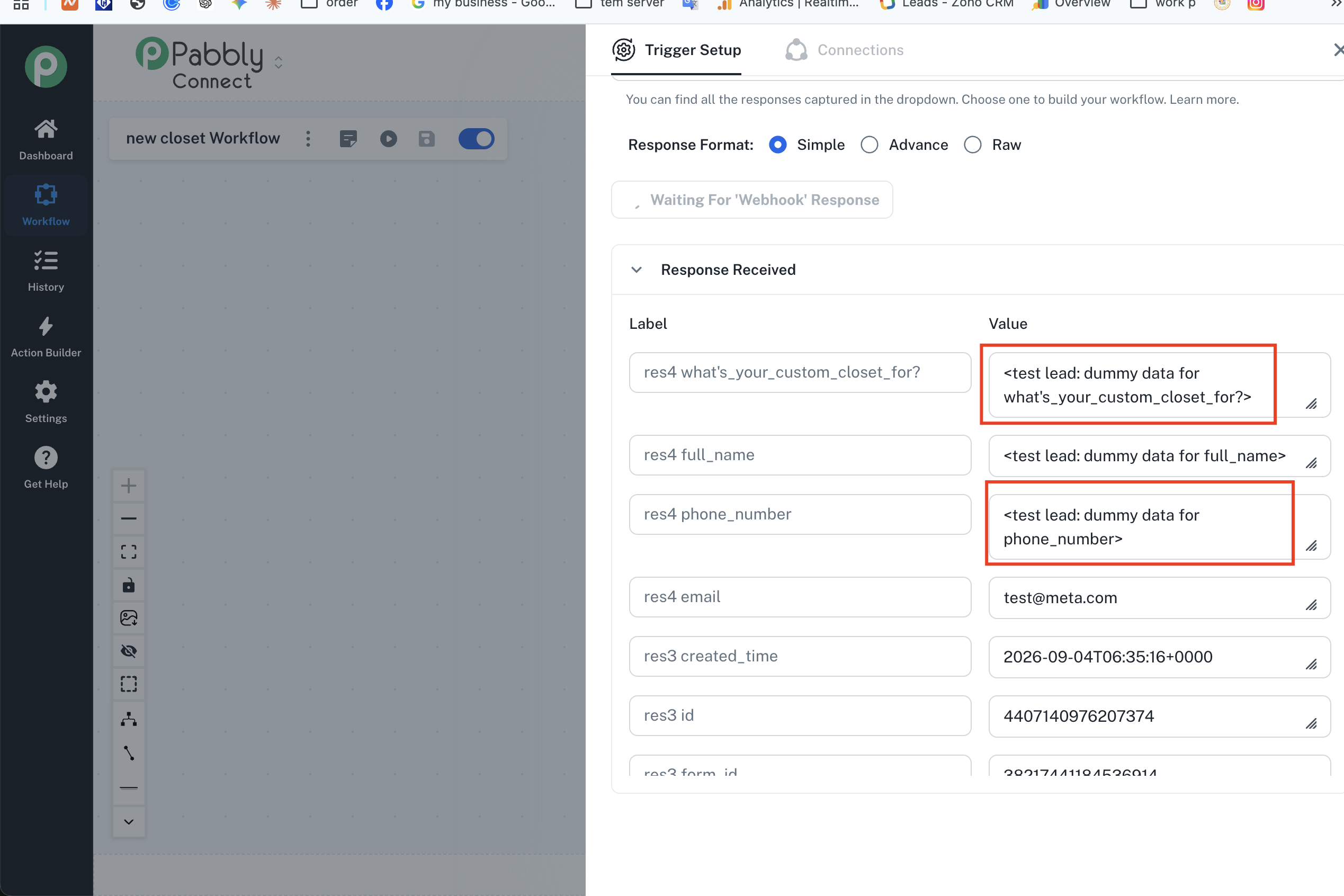
I am facing an issue where dummy/sample values or field names are being added to my Google Sheets columns instead of actual lead values from my Facebook Lead Ads integration.
Issue Details:
In Google Sheets, fields like Full Name, Phone Number, and Custom Questions are getting mapped incorrectly or showing labels like
<test lead: dummy data for full_name>/phone_number.The dynamic values are not populating in the expected columns.
Steps I have tried:
Verified the column headers in Google Sheets.
Re-mapped the response fields in Pabbly Connect.
Could you please check my workflow and let me know why the actual field values are not passing correctly into Google Sheets?
Thank you!
Hello Shabbir,
The dummy values (<test lead: dummy data for...) appear in the response when testing using Facebook's Lead Testing Tool or when capturing an initial sample response before an actual lead comes in.
To update your workflow with real lead data:
Wait for a real lead to submit: Allow a new, live lead submission to come through your Facebook Lead Form.
Refresh the response: Open your workflow, open the Facebook Lead Ads trigger step, and click the Refresh button in the Response Received box to pull in the latest response.
Select the latest lead: Choose the newest response from the response dropdown list so that real lead details display.
Remap the fields: Re-map these updated dynamic fields (e.g., Full Name, Phone Number, Email) into your Google Sheets action step and save the workflow.
Once mapped with a real lead's response, all future automated executions will send actual lead data to your Google Sheet.
Please let us know if you need any further assistance!
Thanks & Regards,
Hrishabh
Customer Support Associate
🌐 Pabbly.com
👉 Rate your support